Seguno Email Marketing built for Shopify
let's chat
HomeSeguno Blog

Promotional pricing strategies: how to choose the right Shopify discount type

Author
Tracy Puckett
Tracy Puckett
Content Manager
Contributors
No items found.

Shopify merchants don’t need to shadow the retailer playbook of running sale after sale. But that doesn’t mean promotional pricing doesn’t have a place. 

Discounts can drive demand, boost short-term sales, and reward and encourage loyalty. With careful consideration, Shopify discounts are often integral to achieving profitability goals. 

 We’re breaking down Shopify discount types, when to use them, and best practices for protecting the bottom line.

This article is part of Seguno’s Shopify Discount Strategy Series, which covers discount types, safeguards, unique codes, and promotion strategy.

How to decide between automatic discounts vs discount codes

Before we wade into all of the Shopify discount types, the first decision is choosing between:

  1. Running an automatic discount that instantly applies at checkout, and is therefore available to any visitor to your online shop, or 
  2. Offering a Shopify discount code that a customer must enter at checkout; it could be available to any website visitor or shared through a different marketing channel

The chart below is a basic guide for determining the option most appropriate for your goal.

Discount type Best for when … Pros Cons
Automatic discounts You want a frictionless, sitewide promotion that applies without customer effort
  • No code to remember or enter
  • Lower checkout friction
  • Less control over who receives it
  • Harder to personalize or segment
  • Can unintentionally stack with other offers
Discount codes You want control, targeting, or better attribution
  • Easy to target specific audiences
  • Supports unique and one-time-use codes
  • Requires customer action at checkout
  • Codes can be shared or leaked without the right barriers


When and how to use the 4 Shopify discount types

Pulling off a successful promotional pricing strategy starts with identifying your business goal and aligning it with the right discount. Below are recommendations and advice for when to use each Shopify discount type:

  1. Amount off products
  2. Amount off order
  3. Buy X get Y
  4. Free shipping 

When to use the amount-off products discount 

The “amount off products” option lets your shoppers apply a discount (percentage or fixed dollar value) to specific items or collections you designate. 

It’s the most popular of the bunch. According to research, 79.7% of shoppers surveyed said that a percentage or amount off an item makes them most likely to purchase. 
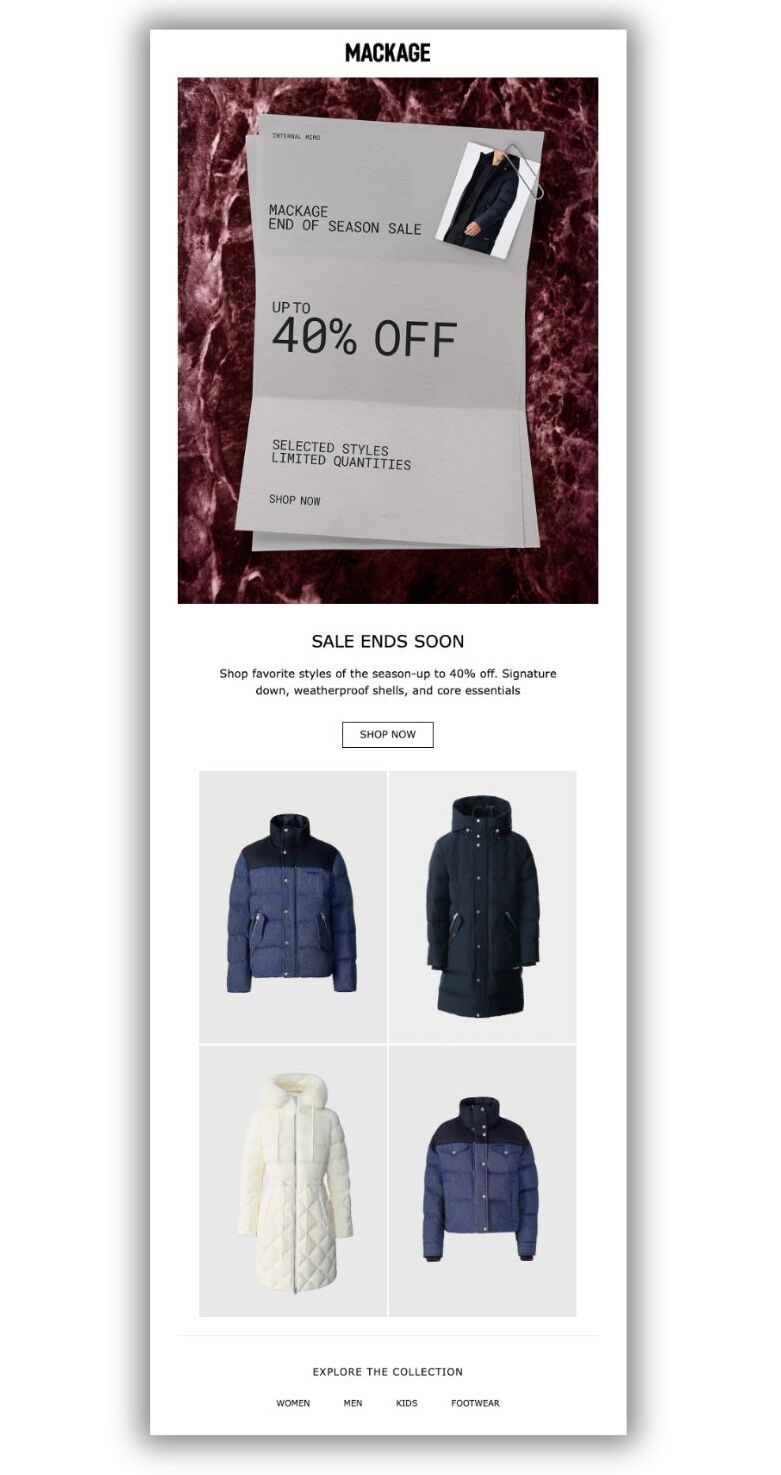
Promotional email design advertising an end-of-season sale with up to 40% off, featuring winter jackets and a “Shop Now” call-to-action.
Mackage promotes a multi-discount, end-of-season sale on its winter collection

Use the amount-off product discount to:

  • Promote or clear inventory of specific SKUs or collections
  • Control your margins 
  • Test demand for new or seasonal products

Studies show that shoppers perceive a dollar-value discount as a better incentive for higher-priced purchases of $100 or more than a percentage off. The reverse is true for products under $100. 

When to use the amount-off order discount 

The “amount off order” option applies either a percentage or a fixed discount to everything a customer places in the cart. Therefore, it’s ideal for influencing total cart value.

Email screenshot with the headline 'Get 20% off' with a photo of pasta noodles
In this email example, delicatezza shows the cost savings of specific products

Use the amount-off order discount to: 

  • Run sitewide sales for key shopping periods, like Black Friday and Cyber Monday
  • Boost lifecycle-based promotions, such as welcome emails or thank you messages
  • Increase average order value (AOV)

An order discount without guardrails can quickly damage profit margins. Maintain control over a sitewide sale with a fixed-amount discount paired with a minimum purchase requirement. 

If you’re willing to loosen your grip for a potentially bigger payoff, implement a percentage-off discount with a minimum spend.   

Bonus tip: Studies show that placing the “bad news” before the good when promoting your Shopify discounts improves click-through rates. So, announce the condition first, followed by the reward; i.e., “spend $100 and get $10 off.” 


When to use the Buy X get Y discount

The “Buy X get Y” option rewards customers with a discount on an additional product (or products) after spending a specific amount, buying a minimum quantity, or purchasing a particular product/collection.  

Of the various combinations, here’s what it can look like: 

  • Buy 1, get 1 free (BOGO) — or B2G1 free, etc. 
  • Buy 1, get ½ off another product
  • Spend $75, get __ for free
  • Spend $50 from ___ collection, get 30% off ___ 
Email screenshot with headline 'It'sa. match! buy one, get one 40%" with photo of two headphones side by side
Raycon goes the buy 1, get 1 40% off route

Use Buy X get Y discounts to:

  • Increase products per order
  • Clear excess or slow-moving inventory
  • Introduce complementary products
  • Increase perceived value without a sitewide discount

While Buy X get Y is less popular than other Shopify discounts, research from our 2025 Unique Discount Benchmarking Report indicates that larger brands see their value. Shopify stores with a GMV of at least $20 million use Buy X get Y (with unique, one-time-use codes) more frequently than smaller brands. 

Free shipping 

The “free shipping” option allows you to waive shipping fees. 

It’s an ideal tactic for removing checkout friction. According to Baymard Institute research, 48% of consumers abandon their carts during online checkout because extra costs, including shipping, are too high.

Email screenshot with the headline 'Saw the cost of shipping and skedaddled?' along with a photo of a woman holding a mug and the words "free shipping' overlaid
Alpinecho gives free shipping with a $50 minimum spend

Use free-shipping discounts to:

  • Reduce cart abandonment
  • Encourage higher AOV by requiring a threshold
  • Preserve product pricing and brand perception

Set a minimum purchase requirement to avoid hemorrhaging money. Research indicates 58% of shoppers will add items to their cart to qualify. Do the math to ensure it’s not an arbitrary threshold that infringes on profits.

Pick your promotional pricing strategy and build in protections

With thoughtful planning, discount pricing can attract and retain customers and help you fulfill your brand’s sales ambitions. 

It requires matching the right Shopify discount to the goal, along with adding discount safeguards such as:

  • Setting minimum spending thresholds
  • Reserving the discount for higher-priced products or collections 
  • Limiting an offer to high-value segments
  • Preventing leakage with unique coupon codes 

Shopify discounts aren’t just a tool for quick revenue wins. They can be a reliable resource for attaining a healthy bottom line over the long haul. 

create, manage, and track your email marketing—without leaving Shopify.

Seguno is the top-rated email solution built exclusively for Shopify. Grow your sales with high-performing newsletters, email automation campaigns, and integrations with Facebook, Instagram, banners, pop-ups and more. Build and send engaging emails in our easy-to-use editor and take email creation to the next level with our Canva integration. Automate your email marketing and drive more revenue with welcome campaigns, checkout abandonment, post-purchase automations, tag triggers and more.

Find Seguno on the Shopify App Store
get email marketing tips, resources, and industry insights to help your Shopify store grow.
continue reading
back to blog

How to promote Shopify discount codes that get used

Promoting Shopify discount codes requires more than flipping a switch. Learn how to leverage your website, email marketing, and other channels to drive awareness and redemptions.

9 discounting safeguards to protect your Shopify profit margins

Learn nine discounting safeguards to help drive Shopify sales while protecting profit margins and avoiding over-discounting.

Shopify discount codes guide (2026): discount types & best practices

Learn how Shopify discount codes work, the types available, when to use them vs automatic discounts, and best practices to protect profits and enhance performance.

Unique coupons: what they are and 11 ways to use them

Learn how unique coupon codes prevent coupon abuse, personalize promotions, and enable attribution — and the ways to use them to attract, delight, and retain customers.
<div class="deliveryability-checker-injection"><div><p class="demo-injection-p"><strong class="larger-text">wonder if your emails land in the&nbsp;inbox?</strong><br>get a general idea of where your emails go, and if you might have a spam&nbsp;issue&nbsp;</p><a href="/check-inbox-placement" class="v4-5-button w-button">check your deliverability &nbsp;→</a></div></div>
<div class="app-download-injection canva-connect"><img src="https://cdn.prod.website-files.com/617bf866dd7a760b2b06c57e/64763bd7cc6913d2a1ddbe6a_canva.svg" loading="lazy" alt="Seguno integrates with Canva so you can compose beautiful emails" class="app-download-injection-canva-logo"><div class="app-injection-text-div"><div class="app-download-injection-inner-div white"><div class="_4-9">4.9</div><img src="https://cdn.prod.website-files.com/617bf866dd7a760b2b06c57e/6268403f745506041a490ef2_review-star.svg" loading="lazy" alt="Shopify Review Star" class="download-app-injection-star canva"><div>Shopify Connect for Canva</div></div><div class="app-download-injection-subhead white">instantly access your product images in&nbsp;Canva</div></div><a href="https://apps.shopify.com/canva-connect?ref=seguno&amp;channel=com&amp;utm_source=blog&amp;utm_medium=website&amp;utm_campaign=blog+call+out" target="_blank" class="app-download-injection-button canva w-button">Get details &amp; install</a></div>
<div class="bfcm24-injection"><p class="bfcm24-injection-p"><strong class="larger-text">the no-sweat plan for BFCM email prep</strong><br>6 weeks, one easy task per week</p><a href="/bfcm" class="v4-5-button w-button">get the plan &nbsp;→</a></div>
<div class="app-download-injection"><img src="https://cdn.prod.website-files.com/617bf866dd7a760b2b06c57e/62683f35e7a0c581770d186b_shopify-icon.svg" loading="lazy" alt="Seguno + Shopify 4EVER" class="app-download-injection-shopify-logo"><div class="app-injection-text-div"><div class="app-download-injection-inner-div"><div class="_4-9">4.9</div><img src="https://cdn.prod.website-files.com/617bf866dd7a760b2b06c57e/6268403f745506041a490ef2_review-star.svg" loading="lazy" alt="Shopify Review Star" class="download-app-injection-star"><div>Seguno Dynamic Banners</div></div><div class="app-download-injection-subhead">boost on-site engagement and sales </div></div><a href="https://apps.shopify.com/coupon-banner-with-countdown-carousel?ref=seguno&amp;channel=com&amp;utm_source=blog&amp;utm_medium=website&amp;utm_campaign=blog+call+out&amp;_gl=1*svg4pt*_gcl_au*MTUzMzgzMzYuMTcyMjU0MjE4NA..*_ga*NjgzMjEyMTA2LjE3MjI1NDIxODQ.*_ga_T9CX65NBQN*MTcyMzIxNDEyOS44LjEuMTcyMzIxNDEzMS41OC4wLjU3MTg4NzU0OA.." target="_blank" class="app-download-injection-button w-button">Get details &amp; install</a></div>
<div class="post-purchase-injection"><img src="https://cdn.prod.website-files.com/617bf866dd7a760b2b06c57e/6643cb72a9ef5fafa0dc9eac_post-purchase-automation-flow.webp" loading="lazy" sizes="(max-width: 479px) 83vw, (max-width: 767px) 61vw, (max-width: 991px) 36vw, 35vw" srcset="https://cdn.prod.website-files.com/617bf866dd7a760b2b06c57e/6643cb72a9ef5fafa0dc9eac_post-purchase-automation-flow-p-500.webp 500w, https://cdn.prod.website-files.com/617bf866dd7a760b2b06c57e/6643cb72a9ef5fafa0dc9eac_post-purchase-automation-flow-p-800.webp 800w, https://cdn.prod.website-files.com/617bf866dd7a760b2b06c57e/6643cb72a9ef5fafa0dc9eac_post-purchase-automation-flow-p-1080.webp 1080w, https://cdn.prod.website-files.com/617bf866dd7a760b2b06c57e/6643cb72a9ef5fafa0dc9eac_post-purchase-automation-flow.webp 1200w" alt="Download your custom post-purchase automation template from Seguno" class="pp-image"><div><p class="demo-injection-p"><strong class="larger-text">get a road map for post-purchase emails</strong><br>receive a custom automation template based on your goals &nbsp;</p><a href="/post-purchase" class="v4-5-button w-button">get your free template &nbsp;→</a></div></div>
<div style="display:none;"></div>
<div class="app-download-injection"><img src="https://assets-global.website-files.com/617bf866dd7a760b2b06c57e/62683f35e7a0c581770d186b_shopify-icon.svg" loading="lazy" alt="Seguno + Shopify 4EVER" class="app-download-injection-shopify-logo"><div class="app-injection-text-div"><div class="app-download-injection-inner-div"><div class="_4-9">4.9</div><img src="https://assets-global.website-files.com/617bf866dd7a760b2b06c57e/6268403f745506041a490ef2_review-star.svg" loading="lazy" alt="Shopify Review Star" class="download-app-injection-star"><div>Seguno Product Reviews</div></div><div class="app-download-injection-subhead">gather product customer reviews and leverage feedback</div></div><a href="https://apps.shopify.com/seguno-product-reviews?ref=seguno&amp;channel=com&amp;utm_source=blog&amp;utm_medium=website&amp;utm_campaign=blog+call+out" target="_blank" class="app-download-injection-button w-button">Get details &amp; install</a></div>
<a href="/bfcm" target="_blank" class="holiday-hub-injection bfcm-injection w-inline-block"><div class="bfcm-injection-bfcm">Best. BFCM. Ever.</div><h5 class="hh-injection-text bfcm">get the Black Friday email marketing resources, tips, and tools you need to help your Shopify store succeed</h5><div class="hh23-injection-faux-button bfcm">visit the BFCM resource center</div></a>
<a href="/holiday-hub" target="_blank" class="holiday-hub-injection w-inline-block"><img src="https://global-uploads.webflow.com/617bf866dd7a760b2b06c57e/6509abc2ee5c44d613124ac3_holiday-hub.svg" loading="lazy" width="854" alt="Seguno Holiday Hub - email marketing resources, tips, and tools you need to help your Shopify store succeed" class="hh23-holiday-hub"><h3 class="hh-injection-text">email marketing resources, tips, and tools you need to help your Shopify store succeed</h3><div class="hh23-injection-faux-button">visit the holiday hub</div></a>
<div class="app-download-injection popup-app-injection"><img src="https://cdn.prod.website-files.com/617bf866dd7a760b2b06c57e/62683f35e7a0c581770d186b_shopify-icon.svg" loading="lazy" alt="Seguno + Shopify 4EVER" class="app-download-injection-shopify-logo"><div class="app-injection-text-div"><div class="app-download-injection-inner-div popup-app-injection"><div class="_4-9 popup-app-injection">5.0</div><img src="https://cdn.prod.website-files.com/617bf866dd7a760b2b06c57e/63b58f03d4aad81dd34f199d_review-star-white.svg" loading="lazy" alt="" class="download-app-injection-star"><div>Seguno Popups &amp; Exit Intent</div></div><div class="app-download-injection-subhead">Create, trigger, and track popups from your shop's Admin</div></div><a href="https://apps.shopify.com/seguno-popups?ref=seguno&channel=com&utm_source=courses&utm_medium=website&utm_campaign=how-to-grow-your-email-marketing-list-course" class="app-download-injection-button w-button" target="_blank">Get details &amp; install</a></div>
<div class="app-download-injection"><img src="https://cdn.prod.website-files.com/617bf866dd7a760b2b06c57e/63caa3c6f461e8d2b575af1d_Bulk-Discount-Code-Logo.svg" loading="lazy" alt="Bulk Discount Code Bot App for Shopify" class="app-download-injection-bulk-discount-icon"><div class="app-injection-text-div"><div class="app-download-injection-inner-div"><div class="_4-9">4.9</div><img src="https://cdn.prod.website-files.com/617bf866dd7a760b2b06c57e/6268403f745506041a490ef2_review-star.svg" loading="lazy" alt="Shopify Review Star" class="download-app-injection-star"><div>Bulk Discount Code Bot</div></div><div class="app-download-injection-subhead">Stop coupon abuse with unique discount code sets</div></div><a href="https://apps.shopify.com/bulk-discount-generator?ref=seguno&amp;channel=com&amp;utm_source=blog&amp;utm_medium=website&amp;utm_campaign=blog+call+out" target="_blank" class="app-download-injection-button w-button">Get details &amp; install</a></div>
<div class="app-download-injection popup-app-injection"><img src="https://cdn.prod.website-files.com/617bf866dd7a760b2b06c57e/62683f35e7a0c581770d186b_shopify-icon.svg" loading="lazy" alt="Seguno + Shopify 4EVER" class="app-download-injection-shopify-logo"><div class="app-injection-text-div"><div class="app-download-injection-inner-div popup-app-injection"><div class="_4-9 popup-app-injection">4.7</div><img src="https://cdn.prod.website-files.com/617bf866dd7a760b2b06c57e/63b58f03d4aad81dd34f199d_review-star-white.svg" loading="lazy" alt="" class="download-app-injection-star"><div>Seguno Popups &amp; Exit Intent</div></div><div class="app-download-injection-subhead">Create, trigger, and track popups from your shop's Admin</div></div><a href="https://apps.shopify.com/seguno-popups?ref=seguno&channel=com&utm_source=blog&utm_medium=website&utm_campaign=blog+call+out" class="app-download-injection-button w-button" target="_blank">Get details &amp; install</a></div>
<div class="schedule-a-demo-injection"><div class="demo-injection-heading">Book a 1:1 demo</div><p class="demo-injection-p">Give us 30 minutes and we'll give you a peek at how Seguno's email marketing and popups can elevate your marketing.</p><a href="/schedule-a-demo" class="demo-injection-button w-button">Schedule a Demo</a></div>
<div class="getting-started-injection"><div class="getting-started-subhead">Blog Series</div><h3 class="getting-started-heading">6 steps to start email marketing for your Shopify store</h3><div class="getting-started-collection w-dyn-list"><div role="list" class="getting-started-list w-dyn-items"><div role="listitem" class="getting-started-item w-dyn-item"><a href="/blog/how-to-define-your-unique-selling-proposition" class="getting-started-link w-inline-block"><img src="https://cdn.prod.website-files.com/617bf866dd7a76530b06c57f/6303b64cb6ad91731ba18f27_Post%202%20thumbnail.png" loading="lazy" alt="How to define your unique selling proposition" class="getting-started-image"></a></div><div role="listitem" class="getting-started-item w-dyn-item"><a href="/blog/how-to-grow-your-audience" class="getting-started-link w-inline-block"><img src="https://cdn.prod.website-files.com/617bf866dd7a76530b06c57f/6303b65da556932aea94fa5b_Post%203%20thumbnail.png" loading="lazy" alt="How to grow your audience " class="getting-started-image"></a></div><div role="listitem" class="getting-started-item w-dyn-item"><a href="/blog/your-first-email-automation-start-with-hello" class="getting-started-link w-inline-block"><img src="https://cdn.prod.website-files.com/617bf866dd7a76530b06c57f/6303b66bed7eea3f461421d9_Post%204%20thumbnail.png" loading="lazy" alt="Say hello with your first email automation " class="getting-started-image"></a></div><div role="listitem" class="getting-started-item w-dyn-item"><a href="/blog/tips-for-building-your-first-newsletter" class="getting-started-link w-inline-block"><img src="https://cdn.prod.website-files.com/617bf866dd7a76530b06c57f/6303b68e19aa7b0ce706d5f8_Post%205%20thumbnail.png" loading="lazy" alt="Tips for building your first newsletter " class="getting-started-image"></a></div><div role="listitem" class="getting-started-item w-dyn-item"><a href="/blog/make-email-marketing-efficient-with-templates" class="getting-started-link w-inline-block"><img src="https://cdn.prod.website-files.com/617bf866dd7a76530b06c57f/6303b69e30b81b5b3cfcf791_Post%206%20thumbnail.png" loading="lazy" alt="Make email marketing efficient with templates" class="getting-started-image"></a></div><div role="listitem" class="getting-started-item w-dyn-item"><a href="/blog/convert-interest-to-sales-with-email-automations" class="getting-started-link w-inline-block"><img src="https://cdn.prod.website-files.com/617bf866dd7a76530b06c57f/6303b6b14cae251dbc6a89aa_Post%207%20thumbnail.png" loading="lazy" alt="Convert interest to sales with email automations" class="getting-started-image"></a></div></div></div> <script> window.addEventListener("load",(t=>{var r=$(location).attr("href").split("/").reverse()[0];$(".getting-started-item").each((function(t){var e=$(this).find("a"),s=e.attr("href");r==s.substring(6,s.length)&&(e.attr("href","#"),e.css("opacity","0.3"),e.css("cursor","default"),e.css("transform","none"))}))})); </script>
<div class="app-download-injection"><img src="https://assets.website-files.com/617bf866dd7a760b2b06c57e/62683f35e7a0c581770d186b_shopify-icon.svg" loading="lazy" alt="Seguno + Shopify 4EVER" class="app-download-injection-shopify-logo"><div class="app-injection-text-div"><div class="app-download-injection-inner-div"><div class="_4-9">4.8</div><img src="https://assets.website-files.com/617bf866dd7a760b2b06c57e/6268403f745506041a490ef2_review-star.svg" loading="lazy" alt="Shopify Review Star" class="download-app-injection-star"><div>Seguno Email&nbsp;Marketing</div></div><div class="app-download-injection-subhead">The top-rated email marketing app built exclusively for Shopify</div></div><a href="https://apps.shopify.com/seguno?ref=seguno&channel=com&utm_source=blog&utm_medium=website&utm_campaign=blog+call+out" class="app-download-injection-button w-button" target="_blank">Get details &amp; install</a></div>
<div class="v3-email-signup-section blog-email-signup-insert"><p class="v3-lp-h1 text-white blog-signup-insert">Subscribe to get email marketing tips, resources, and industry insights to help your Shopify store grow.</p><div class="v3-form email-only-form form-centered w-form"><form id="wf-form-Email-Subscription" name="wf-form-Email-Subscription" data-name="Email Subscription" method="get" class="email-only-form" data-wf-page-id="617bf866dd7a76703506c655" data-wf-element-id="e33b17bb-76b8-992b-7b38-764576544155" aria-label="Email Subscription"><input type="email" class="email-only w-input" maxlength="256" name="Email" data-name="Email" placeholder="Please enter your email address" id="Email" required=""><input type="submit" value="Subscribe →" data-wait="Please wait..." class="v3-base-button brown-button email-only-form-button button-rollover w-button"></form><div class="email-only-success-message w-form-done" tabindex="-1" role="region" aria-label="Email Subscription success"><div class="events-text-block text-white center-text"><strong>Awesome, thanks for subscribing!</strong></div></div><div class="w-form-fail" tabindex="-1" role="region" aria-label="Email Subscription failure"><div>Oops! Something went wrong while submitting the form.</div></div></div><div class="email-disclaimer">By submitting this form you agree to receive email marketing messages from Seguno.</div></div>