Seguno Email Marketing built for Shopify
let's chat
HomeSeguno Blog

Shopify discount codes guide (2026): discount types & best practices

Author
Tracy Puckett
Tracy Puckett
Content Manager
Contributors
No items found.

Discounts save customers money, can remove a hurdle to the purchase, and — especially when it’s a personalized promotion — make shoppers feel appreciated. For all of these reasons and more, discounting is a powerful and profitable strategy when done correctly. 

Ready to leap into Shopify discounts but need more confidence? Or do you want to fine-tune your promotions for better results? This guide explores Shopify discount codes, how to use them, and best practices to ensure discounts are an asset and not a liability.  

This guide anchors our Shopify Discount Strategy Series for using discounts without eroding margin. Across the series, we cover how to: choose the right discount type, prevent abuse, use unique codes and promote discounts.


Shopify discounts: why use them, the options, and the limitations

Shopify’s tools include a batch of discount varieties suitable for running promotional pricing strategies that enable things like:

  • Boosting sales 
  • Generating buzz around your brand
  • Driving traffic during slower sales periods
  • Moving excess inventory with loss leader pricing 
  • Recouping a portion of sales from abandoned checkouts 

The four Shopify discount types

Nestled within the Shopify admin is a Discounts tab, offering four options. 

Screenshot from Shopify with "select discount type" bolded, followed by options for: amount off products, amount off order, by X get Y, free shipping
Discount code types in Shopify
  • Amount off products: apply a percentage or fixed amount discount to specific products or collections, with the option to add purchase or quantity amount minimum requirements  
  • Amount off order: same opportunities as “amount off products,” but applied to the entire order 
  • Buy X get Y: provide a discount on specific products or collections, or something for free, when the buyer meets a minimum quantity of items or a spending threshold
  • Free shipping: remove shipping charges with a minimum purchase amount or item quantity 

Shopify allows multiple configurations, from limiting customer segments and specifying applicable collections to setting minimum purchase requirements and maximum discount usage. There is also some leniency to allow combining discounts.

Shopify discount limits 

Shopify makes it easy to create and manage discounts. However, it’s essential to acknowledge that its native tool has limitations, particularly as you move toward more sophisticated strategies.

  • Restricted stacking and flexibility. Though there are combination options, you can’t stack most discount codes. Automatic discounts may conflict with code-based offers. 
  • Display and checkout constraints. Discounts don’t appear on product pages unless you use a third-party tool or custom solution. And you can’t apply some discount types on post-purchase pages.
  • Limited support for advanced discount logic. More complex needs — such as tiered discounting, custom eligibility rules, and behavior-based targeting — require another app. 
  • Basic attribution and reporting. You can see redemptions and gross sales tied to a discount, but not which channel or campaign drove usage, net revenue, or margin impact. 
Looking to advance your promotions? Check out these 10 Shopify discount apps for scaling.


Shopify automatic discounts vs discount codes

Automatically applied storewide sales are a standard tactic for a good reason. They’re simple to implement, easy to understand, and ideal for reaching a broader audience and attracting new customers. 

It’s as simple as picking your Shopify discount type, defining the customer eligibility rules, and clicking the “automatic discount” button when creating the discount. 

The discount is applied in the cart and at checkout when a customer meets the conditions. Job done — there’s nothing extra to do, making for a seamless checkout process. 

Discount codes also save customers money, but require code entry at checkout. The creation process is the same, except for toggling the “discount code” button.
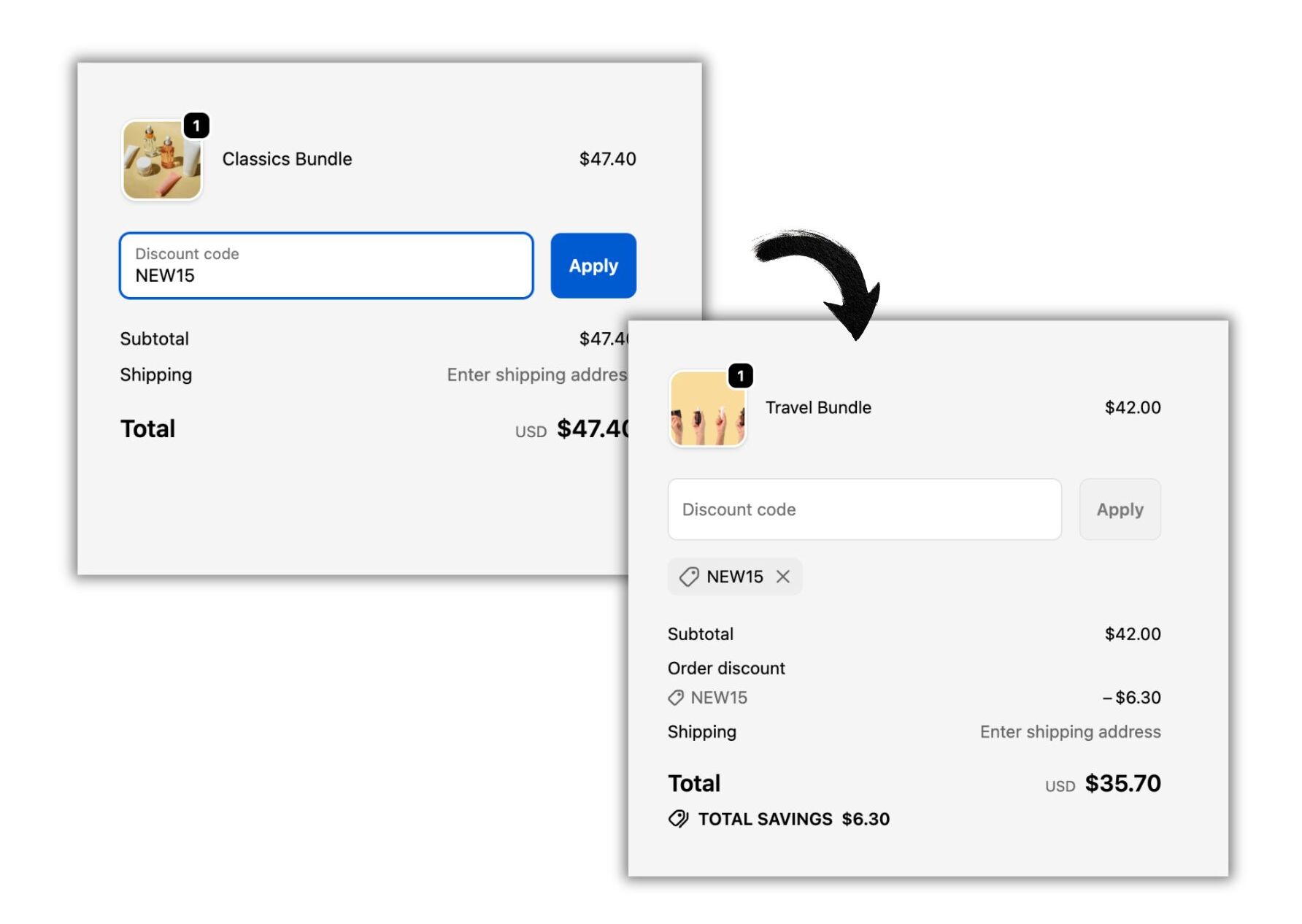
Shopify checkout showing a discount code applied, reducing the order total and displaying total savings.
Shopify discount codes require manual code entry at checkout

Why hassle with creating Shopify coupon codes and adding another step for your shoppers? There are plenty of reasons to take this route, most of which fall into one of two drivers:  

  1. Better targeting. If you want to offer a particular segment of your audience an exclusive offer, discount codes are the way to go for their control factor. 
  2. Better analysis. If you open a sale to everyone and automatically apply a Shopify discount, how do you know what motivates customers to purchase? Was it an email? A social media post? If you create discount codes with thoughtful naming, you can track engagement per marketing channel or campaign. 

Automatic discounts vs discount codes: When to use each

When is it best to use an automatic discount, and when should you create a Shopify coupon code? The chart below presents a straightforward explanation for each discount type.

Discount type Best for when … Pros Cons
Automatic discounts You want a frictionless, sitewide promotion that applies without customer effort
  • No code to remember or enter
  • Lower checkout friction
  • Less control over who receives it
  • Harder to personalize or segment
  • Can unintentionally stack with other offers
Discount codes You want control, targeting, or better attribution
  • Easy to target specific audiences
  • Supports unique and one-time-use codes
  • Requires customer action at checkout
  • Codes can be shared or leaked without the right barriers

Discounting best practices 

No matter the discounting method chosen, four core considerations should guide every promotion your brand runs. Follow these best practices to ensure your discounts drive meaningful results. 

  1. Choose the Shopify discount type that serves your goal. Each discount type serves different purposes. So first, you need to decide between an automatic discount and a discount code. Then there’s choosing the Shopify discount type (percentage off? free shipping?) that best supports the behavior you want to influence. 
  2. Add guardrails to protect profit margins. Discounts should be constrained by clear limits, not left open-ended. Set usage caps, eligibility rules, minimum order thresholds, or one-time-use restrictions to prevent overuse. Consider unique discount codes for the most control.  
  3. Plan your discount promotions to maximize impact. Well-timed, intentional promotions that have a thoughtful distribution plan outperform arbitrary discounting. Map discounts to key moments in the customer lifecycle — such as a first purchase or winback campaign — and to the marketing channels best aligned with reaching your target.
  4. Track discount performance to understand impact. Understand whether your Shopify discounts are driving incremental growth by regularly measuring net revenue, order value, and customer behavior. Ongoing analysis helps you identify what works and refinement options.

Experiment to get the most out of Shopify discount codes

Shopify discount codes provide value to consumers while boosting your shop. They are the better choice — over automatic discounts — when you want to target an audience segment or gauge the impact of your campaigns. 

The best part about Shopify discount codes is their versatility. Whether delighting loyal customers with a “free” gift or marking down a collection of products, you can be as narrow and restrictive with your offer as you want. 

So, test different Shopify discount codes. Build in precautions to combat risks, tinker with the parameters, and analyze the results. 

Keep experimenting, and you’ll find the discounting sweet spot for your brand.

Shopify discount code FAQs

What is the difference between Shopify discount codes and automatic discounts?

Shopify discount codes require customers to enter a code at checkout, while automatic discounts apply automatically when customers meet a condition. Discount codes offer better targeting and attribution, while automatic discounts reduce checkout friction.

When should I use a Shopify discount code instead of an automatic discount?

Use Shopify discount codes when you want control over who receives the offer or when you need to track performance.

Can Shopify discount codes be combined or stacked?

Shopify limits discount stacking. Most discount codes can’t be combined, and automatic discounts may conflict with code-based offers depending on your settings.

How can I prevent Shopify discount code abuse?

Prevent abuse by adding guardrails, such as usage limits, expiration dates, minimum-order requirements, customer eligibility rules, and one-time-use or unique discount codes.

Can you target specific customers or segments with Shopify discount codes?

Yes. Shopify lets you limit discount codes to specific customers or customer groups. More advanced targeting — such as behavior-based or lifecycle-specific discounts — typically requires a third-party app.

How do I track the performance of Shopify discount codes?

Shopify reports basic metrics, such as redemptions and gross sales by discount. To measure actual impact — including net revenue, margin, and attribution — you’ll need more advanced analytics.

Are Shopify discount codes bad for profit margins?

Discount codes aren’t inherently bad for margins. When aligned to a clear goal, constrained with rules, and measured, they can drive incremental revenue without eroding profitability.

create, manage, and track your email marketing—without leaving Shopify.

Seguno is the top-rated email solution built exclusively for Shopify. Grow your sales with high-performing newsletters, email automation campaigns, and integrations with Facebook, Instagram, banners, pop-ups and more. Build and send engaging emails in our easy-to-use editor and take email creation to the next level with our Canva integration. Automate your email marketing and drive more revenue with welcome campaigns, checkout abandonment, post-purchase automations, tag triggers and more.

Find Seguno on the Shopify App Store
get email marketing tips, resources, and industry insights to help your Shopify store grow.
continue reading
back to blog

9 discounting safeguards to protect your Shopify profit margins

Learn nine discounting safeguards to help drive Shopify sales while protecting profit margins and avoiding over-discounting.

Unique coupons: what they are and 11 ways to use them

Learn how unique coupon codes prevent coupon abuse, personalize promotions, and enable attribution — and the ways to use them to attract, delight, and retain customers.

Promotional pricing strategies: how to choose the right Shopify discount type

Learn how to choose the right Shopify discount type for your promotional pricing strategy, with guidance on when to use each without hurting margins.

The 11 best Built for Shopify apps for 2026

Explore the top Built for Shopify apps for scaling operations, from email marketing to referral platforms. We dive into the features behind each app that earned Shopify’s badge of quality.
<div class="deliveryability-checker-injection"><div><p class="demo-injection-p"><strong class="larger-text">wonder if your emails land in the&nbsp;inbox?</strong><br>get a general idea of where your emails go, and if you might have a spam&nbsp;issue&nbsp;</p><a href="/check-inbox-placement" class="v4-5-button w-button">check your deliverability &nbsp;→</a></div></div>
<div class="app-download-injection canva-connect"><img src="https://cdn.prod.website-files.com/617bf866dd7a760b2b06c57e/64763bd7cc6913d2a1ddbe6a_canva.svg" loading="lazy" alt="Seguno integrates with Canva so you can compose beautiful emails" class="app-download-injection-canva-logo"><div class="app-injection-text-div"><div class="app-download-injection-inner-div white"><div class="_4-9">4.9</div><img src="https://cdn.prod.website-files.com/617bf866dd7a760b2b06c57e/6268403f745506041a490ef2_review-star.svg" loading="lazy" alt="Shopify Review Star" class="download-app-injection-star canva"><div>Shopify Connect for Canva</div></div><div class="app-download-injection-subhead white">instantly access your product images in&nbsp;Canva</div></div><a href="https://apps.shopify.com/canva-connect?ref=seguno&amp;channel=com&amp;utm_source=blog&amp;utm_medium=website&amp;utm_campaign=blog+call+out" target="_blank" class="app-download-injection-button canva w-button">Get details &amp; install</a></div>
<div class="bfcm24-injection"><p class="bfcm24-injection-p"><strong class="larger-text">the no-sweat plan for BFCM email prep</strong><br>6 weeks, one easy task per week</p><a href="/bfcm" class="v4-5-button w-button">get the plan &nbsp;→</a></div>
<div class="app-download-injection"><img src="https://cdn.prod.website-files.com/617bf866dd7a760b2b06c57e/62683f35e7a0c581770d186b_shopify-icon.svg" loading="lazy" alt="Seguno + Shopify 4EVER" class="app-download-injection-shopify-logo"><div class="app-injection-text-div"><div class="app-download-injection-inner-div"><div class="_4-9">4.9</div><img src="https://cdn.prod.website-files.com/617bf866dd7a760b2b06c57e/6268403f745506041a490ef2_review-star.svg" loading="lazy" alt="Shopify Review Star" class="download-app-injection-star"><div>Seguno Dynamic Banners</div></div><div class="app-download-injection-subhead">boost on-site engagement and sales </div></div><a href="https://apps.shopify.com/coupon-banner-with-countdown-carousel?ref=seguno&amp;channel=com&amp;utm_source=blog&amp;utm_medium=website&amp;utm_campaign=blog+call+out&amp;_gl=1*svg4pt*_gcl_au*MTUzMzgzMzYuMTcyMjU0MjE4NA..*_ga*NjgzMjEyMTA2LjE3MjI1NDIxODQ.*_ga_T9CX65NBQN*MTcyMzIxNDEyOS44LjEuMTcyMzIxNDEzMS41OC4wLjU3MTg4NzU0OA.." target="_blank" class="app-download-injection-button w-button">Get details &amp; install</a></div>
<div class="post-purchase-injection"><img src="https://cdn.prod.website-files.com/617bf866dd7a760b2b06c57e/6643cb72a9ef5fafa0dc9eac_post-purchase-automation-flow.webp" loading="lazy" sizes="(max-width: 479px) 83vw, (max-width: 767px) 61vw, (max-width: 991px) 36vw, 35vw" srcset="https://cdn.prod.website-files.com/617bf866dd7a760b2b06c57e/6643cb72a9ef5fafa0dc9eac_post-purchase-automation-flow-p-500.webp 500w, https://cdn.prod.website-files.com/617bf866dd7a760b2b06c57e/6643cb72a9ef5fafa0dc9eac_post-purchase-automation-flow-p-800.webp 800w, https://cdn.prod.website-files.com/617bf866dd7a760b2b06c57e/6643cb72a9ef5fafa0dc9eac_post-purchase-automation-flow-p-1080.webp 1080w, https://cdn.prod.website-files.com/617bf866dd7a760b2b06c57e/6643cb72a9ef5fafa0dc9eac_post-purchase-automation-flow.webp 1200w" alt="Download your custom post-purchase automation template from Seguno" class="pp-image"><div><p class="demo-injection-p"><strong class="larger-text">get a road map for post-purchase emails</strong><br>receive a custom automation template based on your goals &nbsp;</p><a href="/post-purchase" class="v4-5-button w-button">get your free template &nbsp;→</a></div></div>
<div style="display:none;"></div>
<div class="app-download-injection"><img src="https://assets-global.website-files.com/617bf866dd7a760b2b06c57e/62683f35e7a0c581770d186b_shopify-icon.svg" loading="lazy" alt="Seguno + Shopify 4EVER" class="app-download-injection-shopify-logo"><div class="app-injection-text-div"><div class="app-download-injection-inner-div"><div class="_4-9">4.9</div><img src="https://assets-global.website-files.com/617bf866dd7a760b2b06c57e/6268403f745506041a490ef2_review-star.svg" loading="lazy" alt="Shopify Review Star" class="download-app-injection-star"><div>Seguno Product Reviews</div></div><div class="app-download-injection-subhead">gather product customer reviews and leverage feedback</div></div><a href="https://apps.shopify.com/seguno-product-reviews?ref=seguno&amp;channel=com&amp;utm_source=blog&amp;utm_medium=website&amp;utm_campaign=blog+call+out" target="_blank" class="app-download-injection-button w-button">Get details &amp; install</a></div>
<a href="/bfcm" target="_blank" class="holiday-hub-injection bfcm-injection w-inline-block"><div class="bfcm-injection-bfcm">Best. BFCM. Ever.</div><h5 class="hh-injection-text bfcm">get the Black Friday email marketing resources, tips, and tools you need to help your Shopify store succeed</h5><div class="hh23-injection-faux-button bfcm">visit the BFCM resource center</div></a>
<a href="/holiday-hub" target="_blank" class="holiday-hub-injection w-inline-block"><img src="https://global-uploads.webflow.com/617bf866dd7a760b2b06c57e/6509abc2ee5c44d613124ac3_holiday-hub.svg" loading="lazy" width="854" alt="Seguno Holiday Hub - email marketing resources, tips, and tools you need to help your Shopify store succeed" class="hh23-holiday-hub"><h3 class="hh-injection-text">email marketing resources, tips, and tools you need to help your Shopify store succeed</h3><div class="hh23-injection-faux-button">visit the holiday hub</div></a>
<div class="app-download-injection popup-app-injection"><img src="https://cdn.prod.website-files.com/617bf866dd7a760b2b06c57e/62683f35e7a0c581770d186b_shopify-icon.svg" loading="lazy" alt="Seguno + Shopify 4EVER" class="app-download-injection-shopify-logo"><div class="app-injection-text-div"><div class="app-download-injection-inner-div popup-app-injection"><div class="_4-9 popup-app-injection">5.0</div><img src="https://cdn.prod.website-files.com/617bf866dd7a760b2b06c57e/63b58f03d4aad81dd34f199d_review-star-white.svg" loading="lazy" alt="" class="download-app-injection-star"><div>Seguno Popups &amp; Exit Intent</div></div><div class="app-download-injection-subhead">Create, trigger, and track popups from your shop's Admin</div></div><a href="https://apps.shopify.com/seguno-popups?ref=seguno&channel=com&utm_source=courses&utm_medium=website&utm_campaign=how-to-grow-your-email-marketing-list-course" class="app-download-injection-button w-button" target="_blank">Get details &amp; install</a></div>
<div class="app-download-injection"><img src="https://cdn.prod.website-files.com/617bf866dd7a760b2b06c57e/63caa3c6f461e8d2b575af1d_Bulk-Discount-Code-Logo.svg" loading="lazy" alt="Bulk Discount Code Bot App for Shopify" class="app-download-injection-bulk-discount-icon"><div class="app-injection-text-div"><div class="app-download-injection-inner-div"><div class="_4-9">4.9</div><img src="https://cdn.prod.website-files.com/617bf866dd7a760b2b06c57e/6268403f745506041a490ef2_review-star.svg" loading="lazy" alt="Shopify Review Star" class="download-app-injection-star"><div>Bulk Discount Code Bot</div></div><div class="app-download-injection-subhead">Stop coupon abuse with unique discount code sets</div></div><a href="https://apps.shopify.com/bulk-discount-generator?ref=seguno&amp;channel=com&amp;utm_source=blog&amp;utm_medium=website&amp;utm_campaign=blog+call+out" target="_blank" class="app-download-injection-button w-button">Get details &amp; install</a></div>
<div class="app-download-injection popup-app-injection"><img src="https://cdn.prod.website-files.com/617bf866dd7a760b2b06c57e/62683f35e7a0c581770d186b_shopify-icon.svg" loading="lazy" alt="Seguno + Shopify 4EVER" class="app-download-injection-shopify-logo"><div class="app-injection-text-div"><div class="app-download-injection-inner-div popup-app-injection"><div class="_4-9 popup-app-injection">4.7</div><img src="https://cdn.prod.website-files.com/617bf866dd7a760b2b06c57e/63b58f03d4aad81dd34f199d_review-star-white.svg" loading="lazy" alt="" class="download-app-injection-star"><div>Seguno Popups &amp; Exit Intent</div></div><div class="app-download-injection-subhead">Create, trigger, and track popups from your shop's Admin</div></div><a href="https://apps.shopify.com/seguno-popups?ref=seguno&channel=com&utm_source=blog&utm_medium=website&utm_campaign=blog+call+out" class="app-download-injection-button w-button" target="_blank">Get details &amp; install</a></div>
<div class="schedule-a-demo-injection"><div class="demo-injection-heading">Book a 1:1 demo</div><p class="demo-injection-p">Give us 30 minutes and we'll give you a peek at how Seguno's email marketing and popups can elevate your marketing.</p><a href="/schedule-a-demo" class="demo-injection-button w-button">Schedule a Demo</a></div>
<div class="getting-started-injection"><div class="getting-started-subhead">Blog Series</div><h3 class="getting-started-heading">6 steps to start email marketing for your Shopify store</h3><div class="getting-started-collection w-dyn-list"><div role="list" class="getting-started-list w-dyn-items"><div role="listitem" class="getting-started-item w-dyn-item"><a href="/blog/how-to-define-your-unique-selling-proposition" class="getting-started-link w-inline-block"><img src="https://cdn.prod.website-files.com/617bf866dd7a76530b06c57f/6303b64cb6ad91731ba18f27_Post%202%20thumbnail.png" loading="lazy" alt="How to define your unique selling proposition" class="getting-started-image"></a></div><div role="listitem" class="getting-started-item w-dyn-item"><a href="/blog/how-to-grow-your-audience" class="getting-started-link w-inline-block"><img src="https://cdn.prod.website-files.com/617bf866dd7a76530b06c57f/6303b65da556932aea94fa5b_Post%203%20thumbnail.png" loading="lazy" alt="How to grow your audience " class="getting-started-image"></a></div><div role="listitem" class="getting-started-item w-dyn-item"><a href="/blog/your-first-email-automation-start-with-hello" class="getting-started-link w-inline-block"><img src="https://cdn.prod.website-files.com/617bf866dd7a76530b06c57f/6303b66bed7eea3f461421d9_Post%204%20thumbnail.png" loading="lazy" alt="Say hello with your first email automation " class="getting-started-image"></a></div><div role="listitem" class="getting-started-item w-dyn-item"><a href="/blog/tips-for-building-your-first-newsletter" class="getting-started-link w-inline-block"><img src="https://cdn.prod.website-files.com/617bf866dd7a76530b06c57f/6303b68e19aa7b0ce706d5f8_Post%205%20thumbnail.png" loading="lazy" alt="Tips for building your first newsletter " class="getting-started-image"></a></div><div role="listitem" class="getting-started-item w-dyn-item"><a href="/blog/make-email-marketing-efficient-with-templates" class="getting-started-link w-inline-block"><img src="https://cdn.prod.website-files.com/617bf866dd7a76530b06c57f/6303b69e30b81b5b3cfcf791_Post%206%20thumbnail.png" loading="lazy" alt="Make email marketing efficient with templates" class="getting-started-image"></a></div><div role="listitem" class="getting-started-item w-dyn-item"><a href="/blog/convert-interest-to-sales-with-email-automations" class="getting-started-link w-inline-block"><img src="https://cdn.prod.website-files.com/617bf866dd7a76530b06c57f/6303b6b14cae251dbc6a89aa_Post%207%20thumbnail.png" loading="lazy" alt="Convert interest to sales with email automations" class="getting-started-image"></a></div></div></div> <script> window.addEventListener("load",(t=>{var r=$(location).attr("href").split("/").reverse()[0];$(".getting-started-item").each((function(t){var e=$(this).find("a"),s=e.attr("href");r==s.substring(6,s.length)&&(e.attr("href","#"),e.css("opacity","0.3"),e.css("cursor","default"),e.css("transform","none"))}))})); </script>
<div class="app-download-injection"><img src="https://assets.website-files.com/617bf866dd7a760b2b06c57e/62683f35e7a0c581770d186b_shopify-icon.svg" loading="lazy" alt="Seguno + Shopify 4EVER" class="app-download-injection-shopify-logo"><div class="app-injection-text-div"><div class="app-download-injection-inner-div"><div class="_4-9">4.8</div><img src="https://assets.website-files.com/617bf866dd7a760b2b06c57e/6268403f745506041a490ef2_review-star.svg" loading="lazy" alt="Shopify Review Star" class="download-app-injection-star"><div>Seguno Email&nbsp;Marketing</div></div><div class="app-download-injection-subhead">The top-rated email marketing app built exclusively for Shopify</div></div><a href="https://apps.shopify.com/seguno?ref=seguno&channel=com&utm_source=blog&utm_medium=website&utm_campaign=blog+call+out" class="app-download-injection-button w-button" target="_blank">Get details &amp; install</a></div>
<div class="v3-email-signup-section blog-email-signup-insert"><p class="v3-lp-h1 text-white blog-signup-insert">Subscribe to get email marketing tips, resources, and industry insights to help your Shopify store grow.</p><div class="v3-form email-only-form form-centered w-form"><form id="wf-form-Email-Subscription" name="wf-form-Email-Subscription" data-name="Email Subscription" method="get" class="email-only-form" data-wf-page-id="617bf866dd7a76703506c655" data-wf-element-id="e33b17bb-76b8-992b-7b38-764576544155" aria-label="Email Subscription"><input type="email" class="email-only w-input" maxlength="256" name="Email" data-name="Email" placeholder="Please enter your email address" id="Email" required=""><input type="submit" value="Subscribe →" data-wait="Please wait..." class="v3-base-button brown-button email-only-form-button button-rollover w-button"></form><div class="email-only-success-message w-form-done" tabindex="-1" role="region" aria-label="Email Subscription success"><div class="events-text-block text-white center-text"><strong>Awesome, thanks for subscribing!</strong></div></div><div class="w-form-fail" tabindex="-1" role="region" aria-label="Email Subscription failure"><div>Oops! Something went wrong while submitting the form.</div></div></div><div class="email-disclaimer">By submitting this form you agree to receive email marketing messages from Seguno.</div></div>