Seguno Email Marketing built for Shopify
let's chat
HomeSeguno Blog

Our top takeaways from Shopify Editions Spring 2026

Author
Cara Marin
Cara Marin
Contributors
No items found.

Scroll the 150+ updates in this Shopify Edition and each headline is more exciting than the next. 

Shopify is calling this the "Everywhere" Edition. Shopify CEO Tobi Lütke's framing is simple. Sell wherever your customers already are — in person, online, in social channels, and now inside AI chats. 

And wherever they show up, the same Shopify data follows. It’s a personalized, cohesive experience no matter the shopping channel. 

We scoured the Shopify Editions Spring ‘26 list for what's most worth your attention. 

The Spring '26 updates Shopify merchants need to know about

Every pick below traces back to one idea: meeting customers everywhere starts with the data and infrastructure Shopify already gives you. 

#1 Structure your product data for AI with Shopify Catalog

Shopify Catalog automatically standardizes and enriches your product data so that agents and AI channels can find and interpret your products. Shopify's own number on this is hard to ignore: data syndicated by Shopify drives 2x more conversion in AI chats.
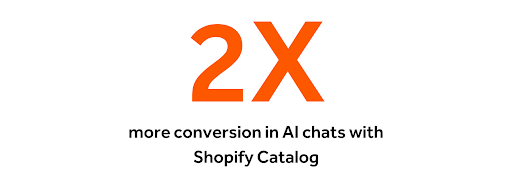
image showing 2x more conversion in AI chats with Shopify Catalog

To sell inside AI assistants and chat checkout, your product data has to be clean and structured. Catalog does that work for you. This is the unglamorous foundation that quietly makes selling everywhere possible.

#2 Ask your data and take action with Sidekick app extensions

Shopify built Sidekick to be different from generic AI tools. It knows your business because it has direct access to your Shopify data, understands commerce workflows, and takes action in your admin. 

With Spring '26, they're extending that reach with Sidekick app extensions. Early partners include Smile, Abra, and Seguno.

There are two kinds of app extensions:

  • Data extensions surface answers and insights from an app's data
  • Action extensions actually do the work for you from inside the chat.

We’re proud to be an early Sidekick partner for both types, enabling our customers to:

  • Ask questions about their email data to find opportunities
  • Create an email via chat, which opens the Seguno editor to view and tweak

Seguno is the only partner platform today that lets you create an email right from Sidekick, going beyond getting answers in chat.
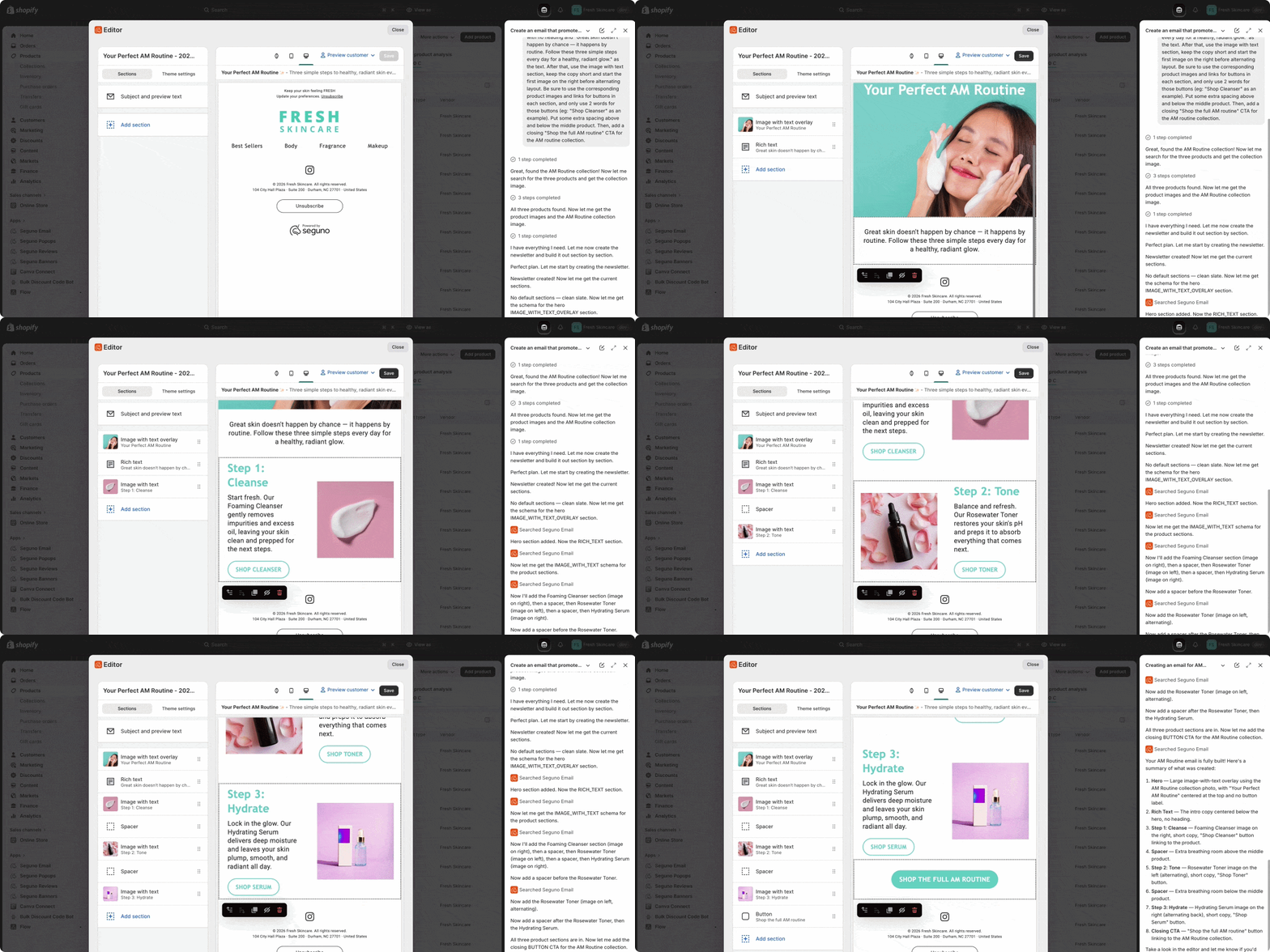
short video that shows a user prompting sidekick to crete an email in seguno, and the left pane showing the results of the creation in seguno email
{{install-email}}


#3 Access Metafields more easily

Metafields let you store custom data — such as customer birthdays and product specifications — and use it to personalize across your store.


Shopify made them noticeably more useful this Edition:

  • Analytics filtered by metafields, so you can slice reporting by your own custom data.
  • Metafields from customers, orders, and collections available directly in the admin, without digging into settings.
  • Up to 50 metafields shown on a product, customer, or order detail page.

Metafields are personalization fuel, but only if the data is accessible. These Shopify Edition updates make it possible to act on custom data without digging through settings. Filter analytics by those same fields to see how segments behave. You have more context in fewer clicks. 

Learn how to use Shopify metafields with Seguno, through personalizing email content, segmenting more precisely, and collecting custom data at signup.


#4 Employ an AI sales associate on your storefront with Shopify Inbox

The Shopify Inbox support tool is evolving into a true AI sales associate. Shoppers can ask about products and raise objections — much like talking to an associate in a physical store. 
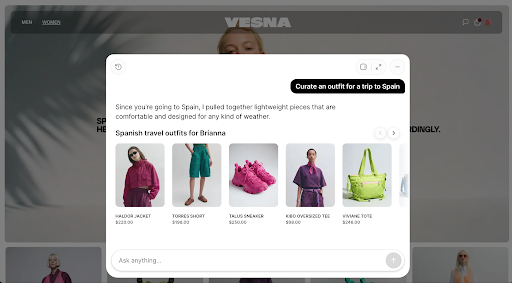
A fashion ecommerce storefront with an AI shopping assistant overlay. The assistant is responding to a request to “Curate an outfit for a trip to Spain” and recommends a collection of lightweight travel items, including a jacket, shorts, sneakers, a tee, and a tote bag. Product images, names, and prices are displayed in a carousel, while a text input field at the bottom invites shoppers to continue the conversation.

The existing assistant mostly pointed shoppers toward answers. The new associate is built to sell, recommending products, handling objections, and nudging the shopper toward checkout.

It pulls from data already in your admin — catalog, inventory, and policies. You control the tone and when to loop in a human. 

#5 Make scannable email discounts for Shopify POS 

New this Shopify Edition: scannable QR-code discounts in Shopify POS. A customer shows a code on their phone, your staff scans it, and the discount applies right at the register. 

Seguno Email has a QR code section built exactly for this. Attach a discount to an email, add the QR section, and it generates a scannable code. It’s ideal for unique codes in particular.

Email editor displaying a QR code content block configuration. Merchants can generate a QR code from either a discount code or a custom URL, choose whether to display the discount code and expiration date, and customize the block settings. The email preview shows a promotion reading “Save 10% when you spend $100” above a scannable QR code, with a note indicating a $100 minimum purchase requirement. The QR code can be used to redeem a discount or direct shoppers to a specific webpage.

#6 Access B2B from your admin, no matter your Shopify plan

Core B2B features moved from Plus-only to all plans — Basic, Grow, and Advanced — earlier this spring.

It's the first time non-Plus merchants can run wholesale and DTC from one unified admin, instead of locking pages, leaning on plugins, or managing wholesale pricing in a separate system. This includes company profiles, volume pricing, up to three B2B catalogs, self-serve ordering, and more.

Honorable mentions

Here are a few other empowering Shopify Edition updates that didn’t make the big list, but are still worth a mention:

  • Shop app in-store pickup & easy returns. Merchants can now offer in-store pickup and easy returns through the Shop app.
  • 365-day sessions for customer accounts. Customers now stay signed in for a full year, so they pick up right where they left off instead of re-authenticating every visit. The payoff: a returning shopper lands in a personalized experience with their order history already there.
  • A/B testing. New A/B testing capabilities help you optimize the store, including scheduled rollouts. Publish a new theme, checkout configuration, or customer accounts setup at a set time or as an A/B test.

Everywhere runs on one catalog

Every update here, big or small, can move your business forward. We encourage you to take a look for yourself on the Shopify Editions page.

Whether a customer meets you in an AI chat or at the register, it's one catalog, one customer record, and one experience. The win isn't more channels. It's the clean foundation that lets them all work together. 

That's exactly why we build the way we do. Seguno is built inside Shopify, so you can put the data you already have to work in your email marketing. We move quickly with Shopify, and are proud to be the first partner to support creating an email straight from Sidekick.

create, manage, and track your email marketing—without leaving Shopify.

Seguno is the top-rated email solution built exclusively for Shopify. Grow your sales with high-performing newsletters, email automation campaigns, and integrations with Facebook, Instagram, banners, pop-ups and more. Build and send engaging emails in our easy-to-use editor and take email creation to the next level with our Canva integration. Automate your email marketing and drive more revenue with welcome campaigns, checkout abandonment, post-purchase automations, tag triggers and more.

Find Seguno on the Shopify App Store
get email marketing tips, resources, and industry insights to help your Shopify store grow.
continue reading
back to blog

Unique coupons: what they are and 11 ways to use them

Learn how unique coupon codes prevent coupon abuse, personalize promotions, and enable attribution — and the ways to use them to attract, delight, and retain customers.

The 11 best Shopify discount apps to scale your store in 2026

Discover the best Shopify discount apps for running advanced, personalized promotions and supporting scalable discounting strategies.

Margin-smart discounting: a guide to profitable Shopify discounts

Strategic Shopify marketers don’t discount carelessly. Becky Chambers of Caddis Eye Appliances shares her process for achieving margin-smart discounting.

How to use popups and customer tags to personalize emails

More data leads to better segmentation. Learn how to collect more information at email signup with form fields and customer tags.
<div class="deliveryability-checker-injection"><div><p class="demo-injection-p"><strong class="larger-text">wonder if your emails land in the&nbsp;inbox?</strong><br>get a general idea of where your emails go, and if you might have a spam&nbsp;issue&nbsp;</p><a href="/check-inbox-placement" class="v4-5-button w-button">check your deliverability &nbsp;→</a></div></div>
<div class="app-download-injection canva-connect"><img src="https://cdn.prod.website-files.com/617bf866dd7a760b2b06c57e/64763bd7cc6913d2a1ddbe6a_canva.svg" loading="lazy" alt="Seguno integrates with Canva so you can compose beautiful emails" class="app-download-injection-canva-logo"><div class="app-injection-text-div"><div class="app-download-injection-inner-div white"><div class="_4-9">4.9</div><img src="https://cdn.prod.website-files.com/617bf866dd7a760b2b06c57e/6268403f745506041a490ef2_review-star.svg" loading="lazy" alt="Shopify Review Star" class="download-app-injection-star canva"><div>Shopify Connect for Canva</div></div><div class="app-download-injection-subhead white">instantly access your product images in&nbsp;Canva</div></div><a href="https://apps.shopify.com/canva-connect?ref=seguno&amp;channel=com&amp;utm_source=blog&amp;utm_medium=website&amp;utm_campaign=blog+call+out" target="_blank" class="app-download-injection-button canva w-button">Get details &amp; install</a></div>
<div class="bfcm24-injection"><p class="bfcm24-injection-p"><strong class="larger-text">the no-sweat plan for BFCM email prep</strong><br>6 weeks, one easy task per week</p><a href="/bfcm" class="v4-5-button w-button">get the plan &nbsp;→</a></div>
<div class="app-download-injection"><img src="https://cdn.prod.website-files.com/617bf866dd7a760b2b06c57e/62683f35e7a0c581770d186b_shopify-icon.svg" loading="lazy" alt="Seguno + Shopify 4EVER" class="app-download-injection-shopify-logo"><div class="app-injection-text-div"><div class="app-download-injection-inner-div"><div class="_4-9">4.9</div><img src="https://cdn.prod.website-files.com/617bf866dd7a760b2b06c57e/6268403f745506041a490ef2_review-star.svg" loading="lazy" alt="Shopify Review Star" class="download-app-injection-star"><div>Seguno Dynamic Banners</div></div><div class="app-download-injection-subhead">boost on-site engagement and sales </div></div><a href="https://apps.shopify.com/coupon-banner-with-countdown-carousel?ref=seguno&amp;channel=com&amp;utm_source=blog&amp;utm_medium=website&amp;utm_campaign=blog+call+out&amp;_gl=1*svg4pt*_gcl_au*MTUzMzgzMzYuMTcyMjU0MjE4NA..*_ga*NjgzMjEyMTA2LjE3MjI1NDIxODQ.*_ga_T9CX65NBQN*MTcyMzIxNDEyOS44LjEuMTcyMzIxNDEzMS41OC4wLjU3MTg4NzU0OA.." target="_blank" class="app-download-injection-button w-button">Get details &amp; install</a></div>
<div class="post-purchase-injection"><img src="https://cdn.prod.website-files.com/617bf866dd7a760b2b06c57e/6643cb72a9ef5fafa0dc9eac_post-purchase-automation-flow.webp" loading="lazy" sizes="(max-width: 479px) 83vw, (max-width: 767px) 61vw, (max-width: 991px) 36vw, 35vw" srcset="https://cdn.prod.website-files.com/617bf866dd7a760b2b06c57e/6643cb72a9ef5fafa0dc9eac_post-purchase-automation-flow-p-500.webp 500w, https://cdn.prod.website-files.com/617bf866dd7a760b2b06c57e/6643cb72a9ef5fafa0dc9eac_post-purchase-automation-flow-p-800.webp 800w, https://cdn.prod.website-files.com/617bf866dd7a760b2b06c57e/6643cb72a9ef5fafa0dc9eac_post-purchase-automation-flow-p-1080.webp 1080w, https://cdn.prod.website-files.com/617bf866dd7a760b2b06c57e/6643cb72a9ef5fafa0dc9eac_post-purchase-automation-flow.webp 1200w" alt="Download your custom post-purchase automation template from Seguno" class="pp-image"><div><p class="demo-injection-p"><strong class="larger-text">get a road map for post-purchase emails</strong><br>receive a custom automation template based on your goals &nbsp;</p><a href="/post-purchase" class="v4-5-button w-button">get your free template &nbsp;→</a></div></div>
<div style="display:none;"></div>
<div class="app-download-injection"><img src="https://assets-global.website-files.com/617bf866dd7a760b2b06c57e/62683f35e7a0c581770d186b_shopify-icon.svg" loading="lazy" alt="Seguno + Shopify 4EVER" class="app-download-injection-shopify-logo"><div class="app-injection-text-div"><div class="app-download-injection-inner-div"><div class="_4-9">4.9</div><img src="https://assets-global.website-files.com/617bf866dd7a760b2b06c57e/6268403f745506041a490ef2_review-star.svg" loading="lazy" alt="Shopify Review Star" class="download-app-injection-star"><div>Seguno Product Reviews</div></div><div class="app-download-injection-subhead">gather product customer reviews and leverage feedback</div></div><a href="https://apps.shopify.com/seguno-product-reviews?ref=seguno&amp;channel=com&amp;utm_source=blog&amp;utm_medium=website&amp;utm_campaign=blog+call+out" target="_blank" class="app-download-injection-button w-button">Get details &amp; install</a></div>
<a href="/bfcm" target="_blank" class="holiday-hub-injection bfcm-injection w-inline-block"><div class="bfcm-injection-bfcm">Best. BFCM. Ever.</div><h5 class="hh-injection-text bfcm">get the Black Friday email marketing resources, tips, and tools you need to help your Shopify store succeed</h5><div class="hh23-injection-faux-button bfcm">visit the BFCM resource center</div></a>
<a href="/holiday-hub" target="_blank" class="holiday-hub-injection w-inline-block"><img src="https://global-uploads.webflow.com/617bf866dd7a760b2b06c57e/6509abc2ee5c44d613124ac3_holiday-hub.svg" loading="lazy" width="854" alt="Seguno Holiday Hub - email marketing resources, tips, and tools you need to help your Shopify store succeed" class="hh23-holiday-hub"><h3 class="hh-injection-text">email marketing resources, tips, and tools you need to help your Shopify store succeed</h3><div class="hh23-injection-faux-button">visit the holiday hub</div></a>
<div class="app-download-injection popup-app-injection"><img src="https://cdn.prod.website-files.com/617bf866dd7a760b2b06c57e/62683f35e7a0c581770d186b_shopify-icon.svg" loading="lazy" alt="Seguno + Shopify 4EVER" class="app-download-injection-shopify-logo"><div class="app-injection-text-div"><div class="app-download-injection-inner-div popup-app-injection"><div class="_4-9 popup-app-injection">5.0</div><img src="https://cdn.prod.website-files.com/617bf866dd7a760b2b06c57e/63b58f03d4aad81dd34f199d_review-star-white.svg" loading="lazy" alt="" class="download-app-injection-star"><div>Seguno Popups &amp; Exit Intent</div></div><div class="app-download-injection-subhead">Create, trigger, and track popups from your shop's Admin</div></div><a href="https://apps.shopify.com/seguno-popups?ref=seguno&channel=com&utm_source=courses&utm_medium=website&utm_campaign=how-to-grow-your-email-marketing-list-course" class="app-download-injection-button w-button" target="_blank">Get details &amp; install</a></div>
<div class="app-download-injection"><img src="https://cdn.prod.website-files.com/617bf866dd7a760b2b06c57e/63caa3c6f461e8d2b575af1d_Bulk-Discount-Code-Logo.svg" loading="lazy" alt="Bulk Discount Code Bot App for Shopify" class="app-download-injection-bulk-discount-icon"><div class="app-injection-text-div"><div class="app-download-injection-inner-div"><div class="_4-9">4.9</div><img src="https://cdn.prod.website-files.com/617bf866dd7a760b2b06c57e/6268403f745506041a490ef2_review-star.svg" loading="lazy" alt="Shopify Review Star" class="download-app-injection-star"><div>Bulk Discount Code Bot</div></div><div class="app-download-injection-subhead">Stop coupon abuse with unique discount code sets</div></div><a href="https://apps.shopify.com/bulk-discount-generator?ref=seguno&amp;channel=com&amp;utm_source=blog&amp;utm_medium=website&amp;utm_campaign=blog+call+out" target="_blank" class="app-download-injection-button w-button">Get details &amp; install</a></div>
<div class="app-download-injection popup-app-injection"><img src="https://cdn.prod.website-files.com/617bf866dd7a760b2b06c57e/62683f35e7a0c581770d186b_shopify-icon.svg" loading="lazy" alt="Seguno + Shopify 4EVER" class="app-download-injection-shopify-logo"><div class="app-injection-text-div"><div class="app-download-injection-inner-div popup-app-injection"><div class="_4-9 popup-app-injection">4.9</div><img src="https://cdn.prod.website-files.com/617bf866dd7a760b2b06c57e/63b58f03d4aad81dd34f199d_review-star-white.svg" loading="lazy" alt="" class="download-app-injection-star"><div>Seguno Popups &amp; Exit Intent</div></div><div class="app-download-injection-subhead">Create, trigger, and track popups from your shop's Admin</div></div><a href="https://apps.shopify.com/seguno-popups?ref=seguno&channel=com&utm_source=blog&utm_medium=website&utm_campaign=blog+call+out" class="app-download-injection-button w-button" target="_blank">Get details &amp; install</a></div>
<div class="schedule-a-demo-injection"><div class="demo-injection-heading">Book a 1:1 demo</div><p class="demo-injection-p">Give us 30 minutes and we'll give you a peek at how Seguno's email marketing and popups can elevate your marketing.</p><a href="/schedule-a-demo" class="demo-injection-button w-button">Schedule a Demo</a></div>
<div class="getting-started-injection"><div class="getting-started-subhead">Blog Series</div><h3 class="getting-started-heading">6 steps to start email marketing for your Shopify store</h3><div class="getting-started-collection w-dyn-list"><div role="list" class="getting-started-list w-dyn-items"><div role="listitem" class="getting-started-item w-dyn-item"><a href="/blog/how-to-define-your-unique-selling-proposition" class="getting-started-link w-inline-block"><img src="https://cdn.prod.website-files.com/617bf866dd7a76530b06c57f/6303b64cb6ad91731ba18f27_Post%202%20thumbnail.png" loading="lazy" alt="How to define your unique selling proposition" class="getting-started-image"></a></div><div role="listitem" class="getting-started-item w-dyn-item"><a href="/blog/how-to-grow-your-audience" class="getting-started-link w-inline-block"><img src="https://cdn.prod.website-files.com/617bf866dd7a76530b06c57f/6303b65da556932aea94fa5b_Post%203%20thumbnail.png" loading="lazy" alt="How to grow your audience " class="getting-started-image"></a></div><div role="listitem" class="getting-started-item w-dyn-item"><a href="/blog/your-first-email-automation-start-with-hello" class="getting-started-link w-inline-block"><img src="https://cdn.prod.website-files.com/617bf866dd7a76530b06c57f/6303b66bed7eea3f461421d9_Post%204%20thumbnail.png" loading="lazy" alt="Say hello with your first email automation " class="getting-started-image"></a></div><div role="listitem" class="getting-started-item w-dyn-item"><a href="/blog/tips-for-building-your-first-newsletter" class="getting-started-link w-inline-block"><img src="https://cdn.prod.website-files.com/617bf866dd7a76530b06c57f/6303b68e19aa7b0ce706d5f8_Post%205%20thumbnail.png" loading="lazy" alt="Tips for building your first newsletter " class="getting-started-image"></a></div><div role="listitem" class="getting-started-item w-dyn-item"><a href="/blog/make-email-marketing-efficient-with-templates" class="getting-started-link w-inline-block"><img src="https://cdn.prod.website-files.com/617bf866dd7a76530b06c57f/6303b69e30b81b5b3cfcf791_Post%206%20thumbnail.png" loading="lazy" alt="Make email marketing efficient with templates" class="getting-started-image"></a></div><div role="listitem" class="getting-started-item w-dyn-item"><a href="/blog/convert-interest-to-sales-with-email-automations" class="getting-started-link w-inline-block"><img src="https://cdn.prod.website-files.com/617bf866dd7a76530b06c57f/6303b6b14cae251dbc6a89aa_Post%207%20thumbnail.png" loading="lazy" alt="Convert interest to sales with email automations" class="getting-started-image"></a></div></div></div> <script> window.addEventListener("load",(t=>{var r=$(location).attr("href").split("/").reverse()[0];$(".getting-started-item").each((function(t){var e=$(this).find("a"),s=e.attr("href");r==s.substring(6,s.length)&&(e.attr("href","#"),e.css("opacity","0.3"),e.css("cursor","default"),e.css("transform","none"))}))})); </script>
<div class="app-download-injection"><img src="https://assets.website-files.com/617bf866dd7a760b2b06c57e/62683f35e7a0c581770d186b_shopify-icon.svg" loading="lazy" alt="Seguno + Shopify 4EVER" class="app-download-injection-shopify-logo"><div class="app-injection-text-div"><div class="app-download-injection-inner-div"><div class="_4-9">4.8</div><img src="https://assets.website-files.com/617bf866dd7a760b2b06c57e/6268403f745506041a490ef2_review-star.svg" loading="lazy" alt="Shopify Review Star" class="download-app-injection-star"><div>Seguno Email&nbsp;Marketing</div></div><div class="app-download-injection-subhead">The top-rated email marketing app built exclusively for Shopify</div></div><a href="https://apps.shopify.com/seguno?ref=seguno&channel=com&utm_source=blog&utm_medium=website&utm_campaign=blog+call+out" class="app-download-injection-button w-button" target="_blank">Get details &amp; install</a></div>
<div class="v3-email-signup-section blog-email-signup-insert"><p class="v3-lp-h1 text-white blog-signup-insert">Subscribe to get email marketing tips, resources, and industry insights to help your Shopify store grow.</p><div class="v3-form email-only-form form-centered w-form"><form id="wf-form-Email-Subscription" name="wf-form-Email-Subscription" data-name="Email Subscription" method="get" class="email-only-form" data-wf-page-id="617bf866dd7a76703506c655" data-wf-element-id="e33b17bb-76b8-992b-7b38-764576544155" aria-label="Email Subscription"><input type="email" class="email-only w-input" maxlength="256" name="Email" data-name="Email" placeholder="Please enter your email address" id="Email" required=""><input type="submit" value="Subscribe →" data-wait="Please wait..." class="v3-base-button brown-button email-only-form-button button-rollover w-button"></form><div class="email-only-success-message w-form-done" tabindex="-1" role="region" aria-label="Email Subscription success"><div class="events-text-block text-white center-text"><strong>Awesome, thanks for subscribing!</strong></div></div><div class="w-form-fail" tabindex="-1" role="region" aria-label="Email Subscription failure"><div>Oops! Something went wrong while submitting the form.</div></div></div><div class="email-disclaimer">By submitting this form you agree to receive email marketing messages from Seguno.</div></div>