


Shopify SMS marketing checklist: how to create a real program

Many Shopify brands don't have an SMS program. They have a send button.
Building truly valuable Shopify SMS marketing goes beyond a signup form, welcome flow, and the occasional promotion. It involves deciding who needs each message, what it should do, and when to hold back.
We’re providing an SMS marketing checklist for Shopify teams, whether they're just starting or taking stock of what they've built. We’re running through the five foundational elements of a strong SMS program, so you can develop an engaged audience and a channel that performs.
The difference between a text channel and an SMS program
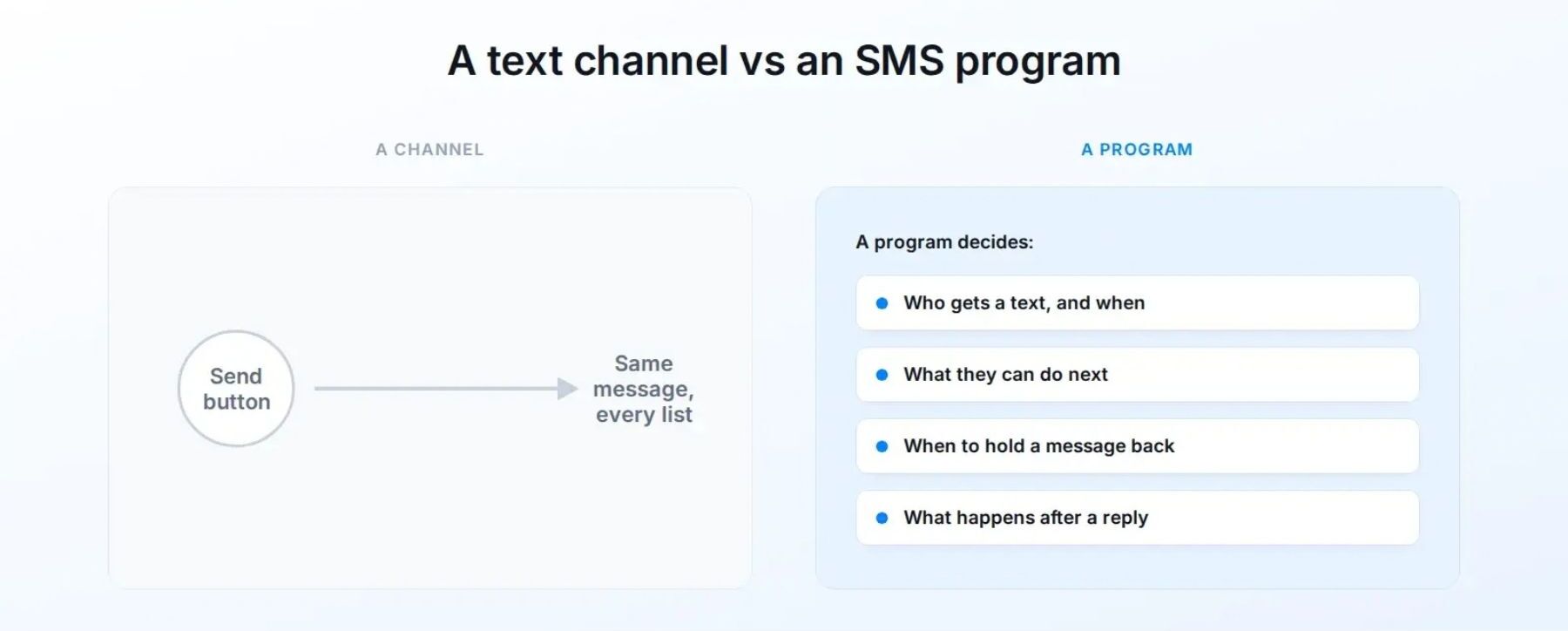
A channel sends messages.
A program provides a consistent way to decide:
- who receives a text and when
- what the customer can do next
- when to hold back a message
- what happens after someone replies
Say a promotion brings in sales, but subscribers who signed up through a particular popup opt out soon afterward.
If you're treating SMS as a channel, the campaign is a win. But if you're running a program, the outcome is mixed. You’d look at the popup and what it promised, and consider if follow-up texts kept the promise.
Or, imagine that shoppers continually reply to a cart reminder with the same shipping question. A channel might continue sending another reminder. A program would answer the question and make shipping information easier to find.
A subscriber list and a few automations can be the start of a program. And the revenue they produce matters.
But revenue needs context, and getting a grasp on it helps determine if you’re running a channel or something more. You have to examine list growth by source, opt-outs, replies, repeat engagement, and the questions customers ask. Those signals show whether you're building an audience that wants to hear from you.
The 5-part SMS marketing checklist for turning a channel into a program
The checklist below covers what it takes to build a program with a strong SMS marketing strategy.
1. Start with permission
Make clear that the customer is joining a marketing SMS list. Explain the kinds of messages they can expect and keep the first few texts consistent with that promise. If someone signed up for restock alerts, an immediate run of unrelated discounts will feel like a different deal.
Treat checkout with special care. A customer providing a phone number for order updates doesn’t permit you to send marketing texts. Shopify treats the SMS marketing opt-in separately from order notifications and does not allow its checkout checkbox to be preselected. Follow the SMS consent, carrier, and platform requirements that apply to your program.
Then, pay attention to the customer experience after sign-up:
- Do messages arrive at sensible times for the recipient?
- Is the frequency close to what the signup experience led them to expect?
- Can they opt out without friction?
- Would the first three texts make sense to someone who remembers what they signed up for?
For a closer look at signup disclosures, opt-in methods, and consent records, read TxtCart's SMS consent guide. Then compare that groundwork with the messages people actually receive.
2. Grow the list at moments that mean something
Shoppers are ready to subscribe at different points, and each point calls for its own invitation.
Instead of one popup that shows the same message to everyone, match the SMS signup form to what the shopper is doing:
- When a shopper shows interest in a product or category, offer updates about it
- When a product is sold out or about to launch, encourage shoppers to sign up for restock or launch news
- At checkout, give people a separate choice to receive marketing texts
- After a purchase, invite customers to sign up for product guidance or replenishment reminders
- At account or loyalty enrollment, explain what SMS adds to the membership

Your follow-up to each signup should match accordingly. Sending everyone the same welcome sequence ignores the reason each one subscribed.
Seguno Popups & Forms can show popups and forms on specific pages and save signup responses to Shopify customer records. Seguno's guide to using popups and customer tags to personalize emails shows how asking subscribers for a preference at signup can shape later messages.
3. Give email and SMS different jobs
Your team may plan email and SMS separately, but customers hear from one brand.
That’s why it’s important to coordinate your email and SMS marketing strategy. While both channels can support a campaign, each needs a clear role so they don’t repeat the same message.
In general, email has room for a product story, images, educational content, and more. SMS is often better suited to timely, concise updates or conversations.
Take a product launch. An email can introduce the collection and explain what is new. SMS is great for subscribers who previously requested early access or wanted to know when a particular item becomes available. Later, a brief text might make sense for someone who showed interest but hasn’t purchased.
A shared campaign calendar is only the start. You also need to account for what each customer has done across channels. Before scheduling a text, ask:
- Has this audience already received the offer by email?
- Does SMS add urgency, utility, or an opportunity to ask a question?
- Has the customer already taken the action we want?
- Will this message still make sense if another planned send arrives first?
Plan both channels together so that someone who has already bought the product via one channel doesn’t get another nudge.
Check out Seguno’s email marketing best practices guide for email planning and segmentation.
4. Let customer behavior trigger what you send
Calendar-based promotions can drive short-term revenue, while well-designed automations respond to specific customer actions and intent. Automations are responses to specific customer actions. In other words, you’re reacting to intent.
Start with a few common customer moments rather than building a long list of flows for segments that you cannot maintain:
- Welcome: When someone subscribes, deliver what the signup promised, then give one useful next step.
- Browse and cart abandonment: Trigger only on recent activity that shows real interest. If shoppers tend to stall on sizing or returns, answer before sending another reminder.
- Post-purchase: Help customers use what they bought before making another offer.
- Replenishment: Time the reminder to when a customer is likely to run low, not to the same date for every buyer.
The rules that stop a message matter just as much as the triggers that start one. A cart reminder needs to stop after the customer makes a purchase. Pause promotions for customers dealing with a support issue. And someone who has already received several texts this week shouldn't get another just because they triggered a new automation.
A setup that appears tidy in a dashboard can translate to an awkward string of text messages. So before you turn anything on, walk through your automations as if you’re a customer experiencing them.
5. Adopt two-way SMS
You don’t need to treat every text as a one-way broadcast. Sending a message that clearly invites replies can reveal questions or hesitations that may be getting in the way of a purchase, and gives your team a chance to resolve them.
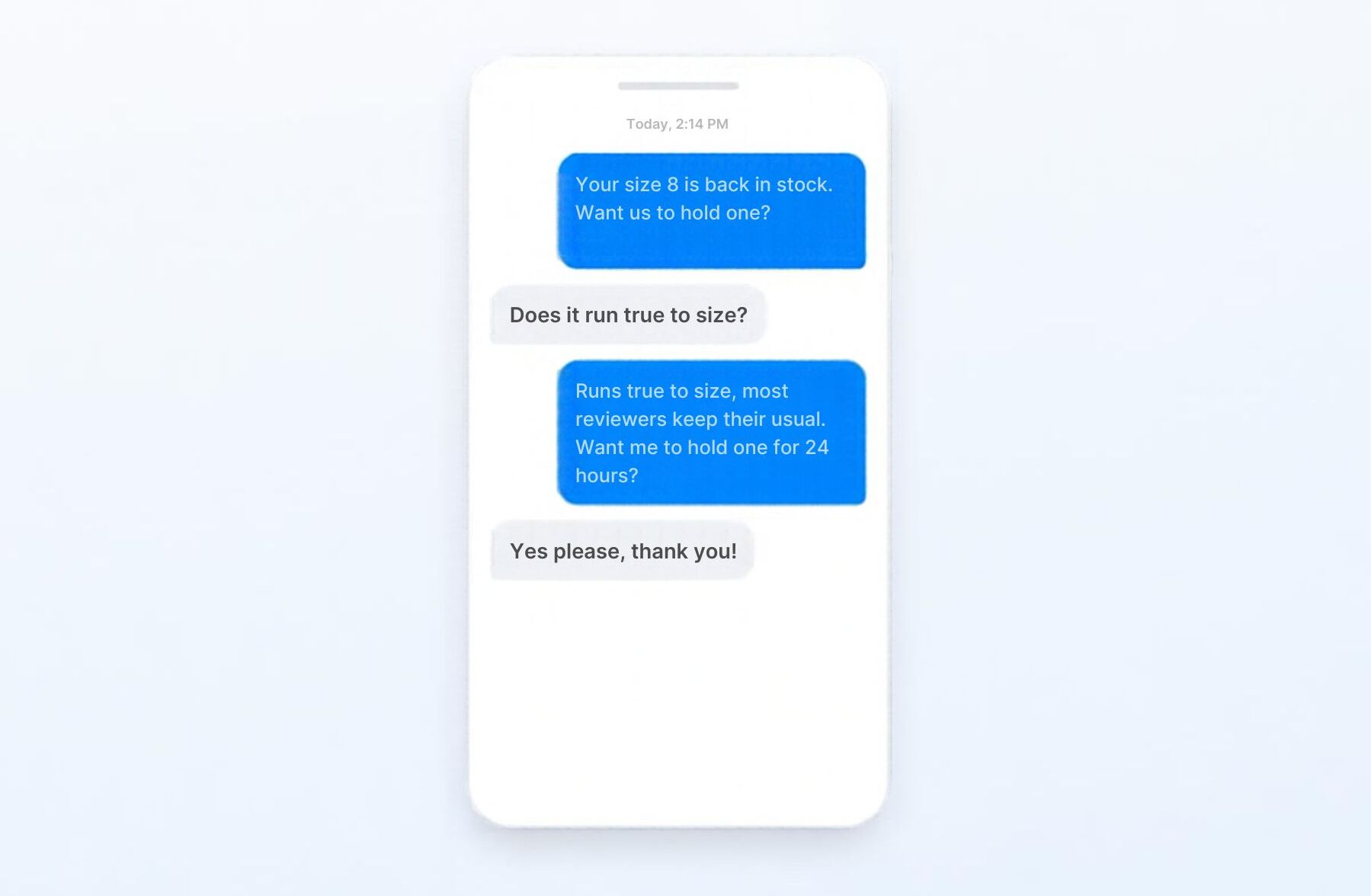
Shoppers often hold back because of a specific question, like "Which size should I get?" or "Does this work with the model I own?" A clear answer can move that shopper forward, versus another reminder.
And as a bonus, repeated questions can identify what’s missing from product pages, shipping information, or campaign copy.
Here’s how to leverage two-way SMS:
- Invite replies when a conversation could help. Be specific. “Reply with a sizing question” gives a clearer next step than a general, “Let us know what you think.”
- Plan for the response before you ask for one. Who handles a product question? How quickly can the team give an accurate answer? If the inbox is unattended, a reply-friendly campaign creates a poor experience.
TxtCart’s guide to two-way SMS explores where conversations fit into an SMS program.
Run the SMS program self-check
Before activating another flow or adding a campaign to the calendar, work through these questions with your team to assess the state of your SMS program:
- Do subscribers understand what they are signing up for?
- Does the first message match what the signup form promised?
- Are you collecting subscribers at moments where SMS has a clear purpose?
- Do you use the preferences you ask people to share?
- Do email and SMS have different, coordinated jobs?
- Does a subscriber’s behavior influence what messages they receive and when?
- Do your flows stop when someone purchases or no longer needs the message?
- Can shoppers reply when their answer would help?
- Is your team prepared to handle replies?
- Are you reviewing opt-outs, responses, and repeat engagement alongside revenue?
- Do you know when to leave the customer alone?
You do not need to fix every gap at once. Start with the clearest weakness in your current setup, whether that is the signup promise, overlapping messages, an unattended inbox, or a flow that does not stop when it should.
Then return to the central question: have you built an SMS program, or have you only turned on another send button?
Kyle Bigley is the founder of TxtCart, a Shopify-native SMS marketing platform that helps ecommerce brands grow their lists, run campaigns and flows, and answer shopper questions through two-way conversations.

create, manage, and track your email marketing—without leaving Shopify.
Seguno is the top-rated email solution built exclusively for Shopify. Grow your sales with high-performing newsletters, email automation campaigns, and integrations with Facebook, Instagram, banners, pop-ups and more. Build and send engaging emails in our easy-to-use editor and take email creation to the next level with our Canva integration. Automate your email marketing and drive more revenue with welcome campaigns, checkout abandonment, post-purchase automations, tag triggers and more.

get email marketing tips, resources, and industry insights to help your Shopify store grow.