

How to use Shopify Sidekick to identify the right products for your next email

If you’ve ever analyzed your marketing emails, you know it identifies the wins and the misses.
But a broader approach to ecommerce data analysis — which also looks at your Shopify store data — opens up a whole new dimension of insights for determining what your customers want.
Sometimes, a deeper dive reveals that your best-selling products don’t get enough email exposure. Other times, the products you over-promote don’t convert.
We’re giving you the Shopify Sidekick prompts to see the bigger picture and decide what to promote next.
What you'll need
You don’t need to be a data expert to extract these deeper findings. All you need are:
- A Shopify store with Seguno Email installed
- Shopify’s AI assistant, Sidekick
Seguno is just one of three email marketing apps integrated with Sidekick, meaning Sidekick can directly surface email data. It reads open rates, click rates, revenue attribution, and more.
Bonus: Unlike other email apps in this launch, Seguno is the only one to give Sidekick write access. So, once you've settled on a newsletter idea, Sidekick can build the email in Seguno.
The Sidekick integration was announced through Shopify Editions Spring ‘26, among 150+ Shopify product updates that help merchants sell wherever customers are shopping.
Step 1: Ask Sidekick what your email subscribers are clicking on
Open Sidekick in your Shopify admin. Start with your email click data to find which products and pages your subscribers are most interested in based on their behavior.
Prompt to try: "What are the top links from my Seguno emails in the last month?"
Sidekick will return a ranked list. Here are the results for our fabricated shop, Fresh Skincare:
Sidekick flagged that the Summer Glow Collection was the top destination by a wide margin, with nearly 50% more clicks than the homepage.
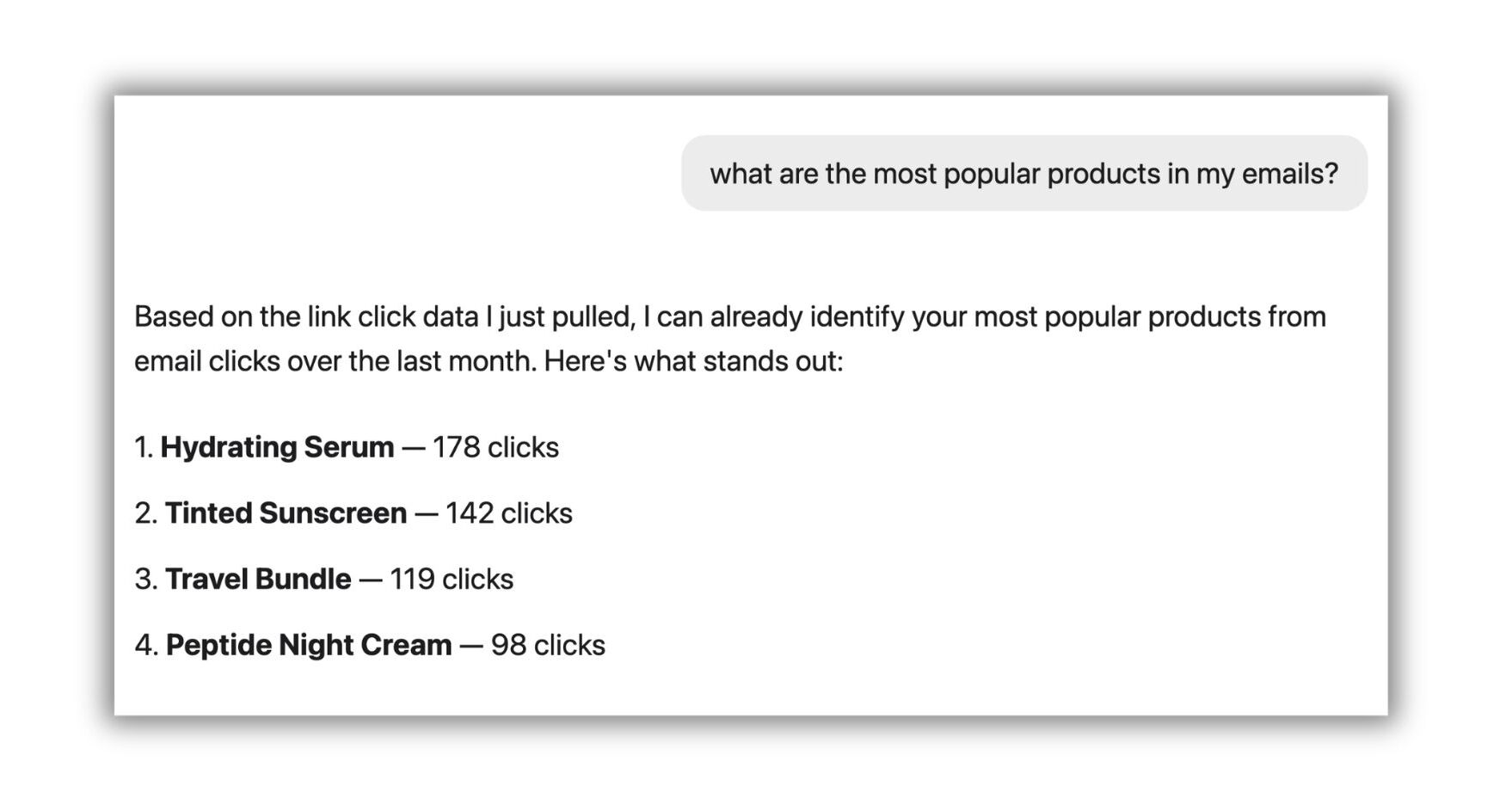
Follow-up prompt: "What are the most popular products in my emails?"
Sidekick can identify the top products based on the link data. For Fresh Skincare, the top individual products were Hydrating Serum, Tinted Sunscreen, Travel Bundle, and Peptide Night Cream.
Step 2: Compare email clicks to what sells
Knowing what people click on in your emails is useful. The meatier data analysis begins when comparing it to storewide sales.
Prompt to try: "Are those the same as the most popular products on my site during that time?"
Sidekick pulls your store's sales data for the same period. The screenshot below shows what it found for Fresh Skincare.
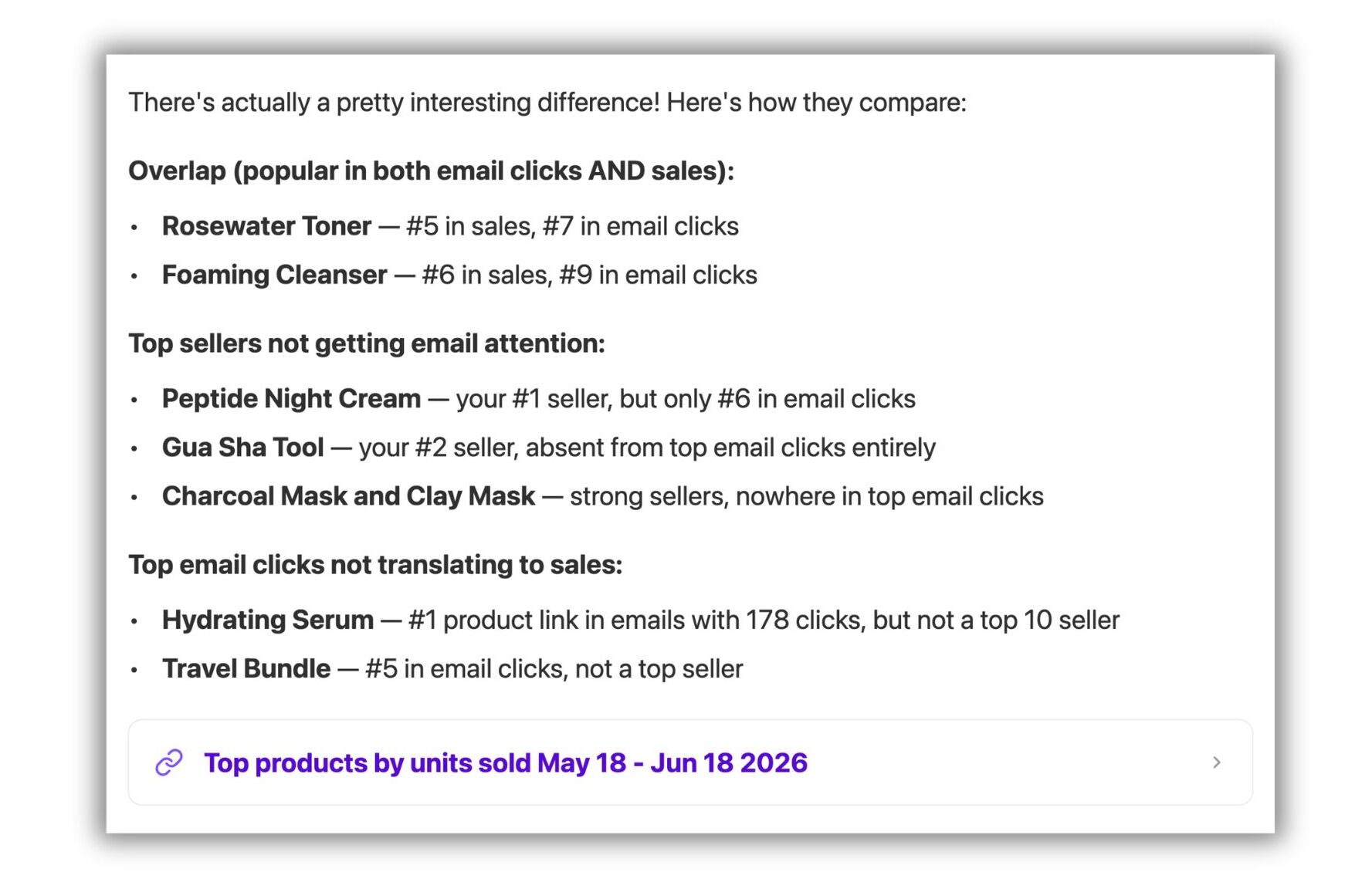
Sidekick's takeaway: Fresh Skincare's emails are over-indexing on serums and bundles while under-promoting their bestsellers, Peptide Night Cream and Gua Sha Tool.
Step 3: Ask for your most viewed products
Clicks and store sales tell part of the story. Page views are the third layer to conducting a more comprehensive ecommerce data analysis. They indicate what people are curious about.
Combine all three for the clearest picture of where to focus your next newsletter.
Prompt to try: "What about the most viewed products on my site? How does that compare to the top-selling and most clicked products?"
Sidekick pulls page view data for the same period and builds a three-way comparison.
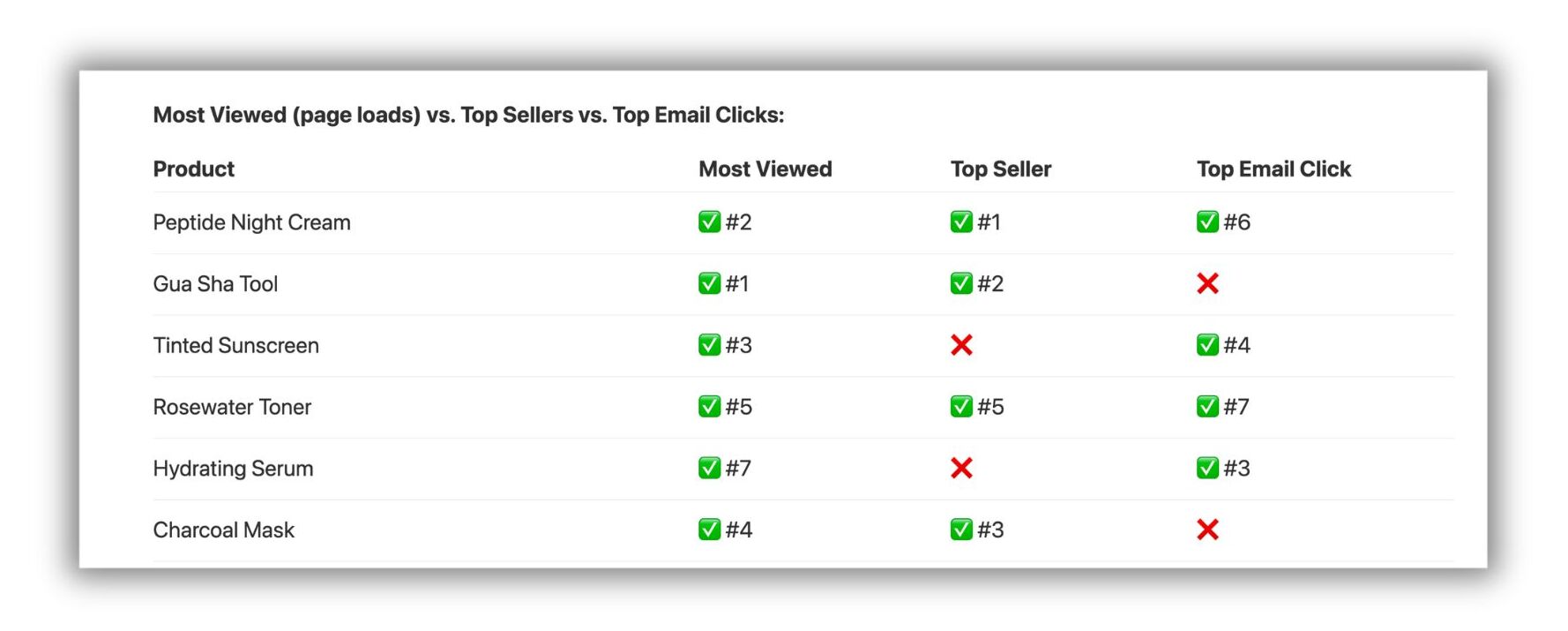
Just as you’d expect from AI, Sidekick continues by interpreting the chart. Here are the takeaways it summarized for Fresh Skincare:
- Peptide Night Cream is your most well-rounded performer — viewed, purchased, and clicked in emails. It deserves a featured spot in your next campaign.
- Gua Sha Tool and Charcoal Mask are getting views and converting to sales, but are nearly invisible in emails. These are your biggest missed opportunities.
- Tinted Sunscreen is highly viewed and heavily clicked in emails, but isn't converting to sales at the same rate — worth investigating whether the product page, pricing, or offer needs work.
- Hydrating Serum is getting heavy email attention but not showing up in top sales — a signal to reconsider how prominently it's being featured.
Sidekick suggested action items, from featuring specific products in upcoming emails to diagnosing why a particular product page listing isn’t converting.
Get more Sidekick prompts for Seguno, from analyzing your automations to translating Shopify reports.
Sidekick x Seguno: analyze data + create the next email
Gaps between what you’re promoting, what people are clicking on, and what’s selling can easily go undetected.
So, steal our prompts and let Sidekick sort through the data you’re sitting on. See where the conversation takes you.
And once you've landed on your next newsletter angle, ask Sidekick to draft it right from the same chat window. Sidekick will create an email directly in Seguno. You’ll have a ready-to-edit draft in seconds.


create, manage, and track your email marketing—without leaving Shopify.
Seguno is the top-rated email solution built exclusively for Shopify. Grow your sales with high-performing newsletters, email automation campaigns, and integrations with Facebook, Instagram, banners, pop-ups and more. Build and send engaging emails in our easy-to-use editor and take email creation to the next level with our Canva integration. Automate your email marketing and drive more revenue with welcome campaigns, checkout abandonment, post-purchase automations, tag triggers and more.

get email marketing tips, resources, and industry insights to help your Shopify store grow.