Seguno Email Marketing for Shopify Merchants
Seguno Email Marketing built for Shopify
pricinglet's chat
HomeSeguno Blog

6 UGC email examples [+best practices] to build trust

Author
Tracy Puckett
Tracy Puckett
Content Manager
Contributors
No items found.

When did you last buy something online without reading reviews or searching for customer feedback? 

Quite possibly never, unless you already love the brand or someone you know recommended the product. 

Humans want reassurance, which is why user-generated content (UGC) can be a powerful tool for Shopify brands to foster trust. Real customers can ease a hesitant shopper’s concerns, often better than you can do alone as a brand.

We rounded up six UGC email examples that harness customer voices, and are covering ways to collect UGC and best practices for using it.  
‍

{{install-email}}

‍

What is UGC, and what power does it have?

Let’s define user-generated content before jumping into UGC email examples. 

UGC is any content about your brand that a customer shares online. This social proof lives on social media platforms, websites, and online forums. It can be authentic feedback from regular customers — the focus of most of this post — or paid content from creators. 

UGC comes in various forms, including customer reviews and testimonials, photos, videos, and social media mentions. 

Numerous studies reveal that UGC impacts consumer decisions. Here are two statistics to chew on from Power Reviews research:

  1. 95% of consumers surveyed said they regularly read product reviews when shopping, and 96% indicate product reviews and ratings have the greatest sway.
  2. 78% of consumers say customer photos and videos are key to purchase decisions, ranking higher than family/friends recommendations (72%).
    ‍
 Use Seguno’s email marketing platform for Shopify to create a UGC email, whether you build it from scratch or use a starter template as the base.


6 UGC email examples to inspire your email program 

Each UGC email example below demonstrates how customer content can establish credibility. 

1. Recommend products

Most UGC email examples leverage customer reviews or testimonials to promote a range of products, typically bestsellers. Take GK Hair, for example.
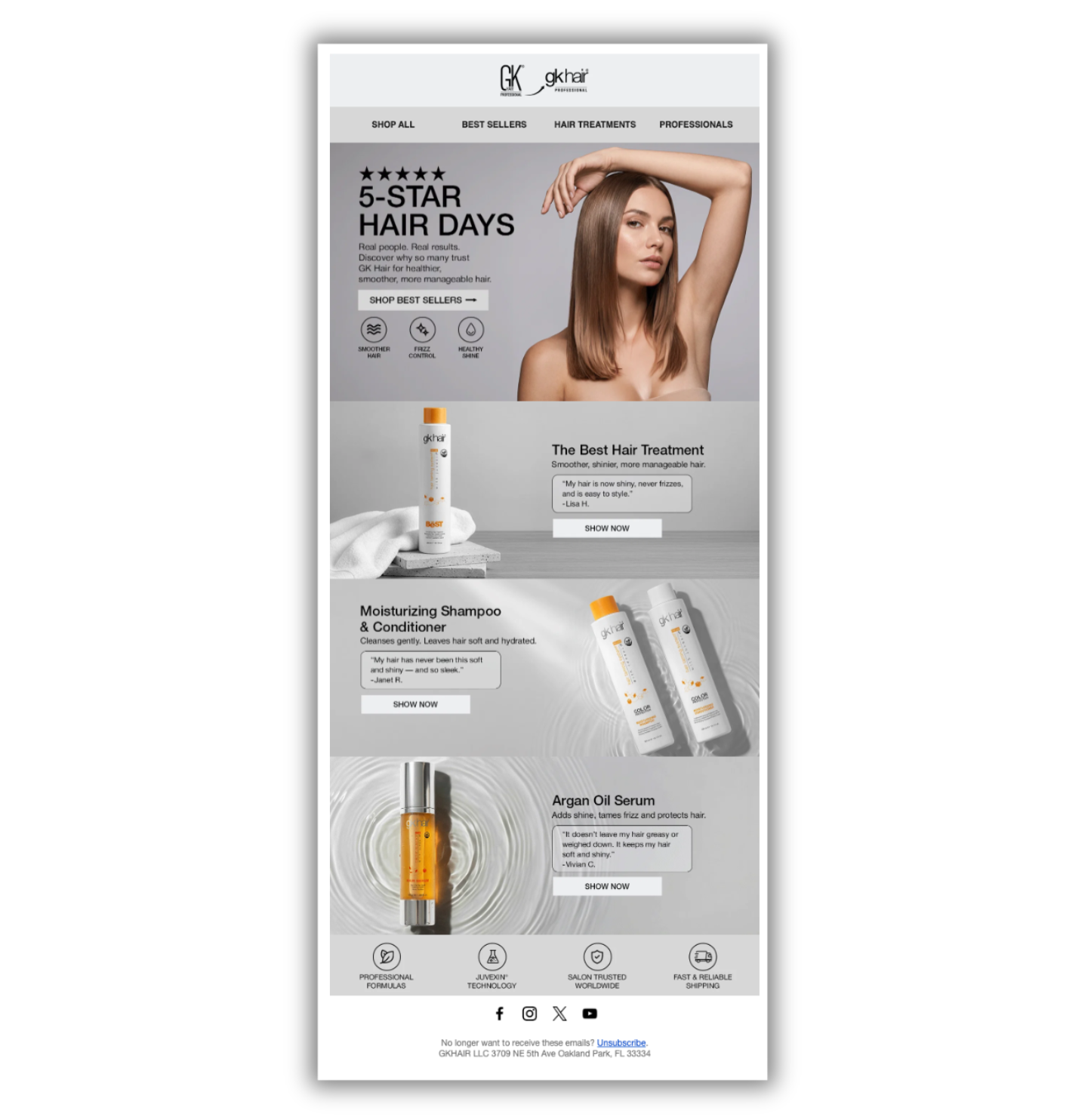
GK Hair promotional email featuring a “5-Star Hair Days” campaign, with a model showcasing smooth hair, product images of hair treatments, moisturizing shampoo and conditioner, and argan oil serum, customer testimonials, and shop now buttons.

What works: 

  1. Highlighting top-performing products in an easy-to-scan format
  2. Pairing a concise customer testimonial with each product featured
  3. A call to action (CTA) for each product, leading directly to the product page 
  4. A CTA to explore all best-sellers
  5. Diverse customer representation helps subscribers see the product is for everyone


2. Stand out with seasonal or holiday campaigns

If you want your brand to capture attention during typical shopping spikes — especially Black Friday Cyber Monday (BFCM) and peak season — then make your email memorable. Sprinkling in customer feedback, especially when it reflects how your brand helps people celebrate, checks that box. 

Loisa does this with a Nochebuena (Christmas Eve) email, using customer quotes to show how its products fit into family traditions.
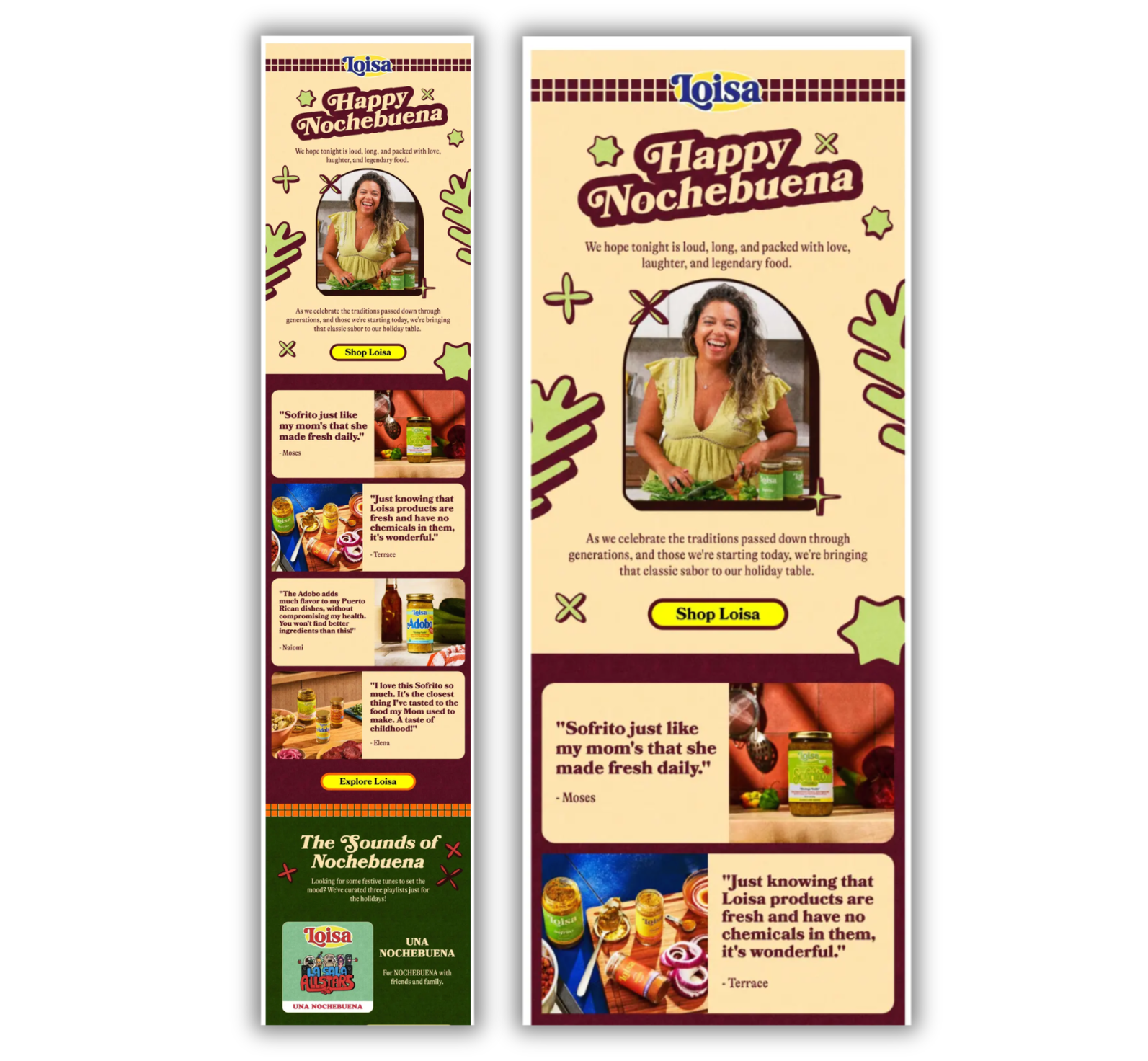
Alt text: Loisa’s festive Nochebuena email featuring a holiday greeting, a woman preparing food, customer testimonials alongside product and food photography, and shopping buttons. The email uses cream, burgundy, green, and yellow colors, with a holiday music playlist featured at the bottom.

What works: 

  1. The opening is warm and specific to the holiday (“We hope tonight is loud, long, and packed with love, laughter, and legendary food”) 
  2. Each customer quote pairs with a product photo; most refer to family and heritage, such as “Sofrito just like my mom’s” and “A taste of childhood” 
  3. The “Sounds of Nochebuena” section — offering three curated playlists — provides value and makes the email feel like a celebration instead of a sales push

3. Shape impressions with welcome emails

Jazz up your welcome email automation series with a message that gives your customers the mic. After all, you’re attempting to establish a rapport with your new subscribers and convince them you’re a good choice. Athletic Brewing Co. nails it. 

Email with the headline 'beers worth boasting about'

What works: 

  1. The headline “Beers worth boasting about” summarizes the ensuing content with pizzazz
  2. The first CTA is a can’t-miss for anyone who doesn’t want to scroll
  3. Various customer testimonials offer different viewpoints, from the gluten-free and booze-free customer to the review-averse
  4. The discount reminder takes a back seat to building credibility 
    ‍

4. Spice up sales promotions 

Nearly every Shopify store turns to a promotional pricing strategy at some point. It’s easy to fall into the trap of run-of-the-mill, stale promotions. That’s why we like Dormify’s breath of fresh air. 

Email featuring Polaroid-type photos, each with two girls sitting on a bed in a dorm room

What works: 

  1. Reiteration of 25% savings throughout, from the top banner to the graphical splashes
  2. Authenticity and relatability through a polaroid-like touch, plus inclusion of social account handles and the college of attendance
  3. Identifying the brand’s products
  4. Encouraging customers to become part of the UGC community 
    ‍
Learn how to use Shopify discount codes without damaging your shop’s margins.

‍

5. Support a cause or a cultural event

Any brand that participates in cause marketing or latches onto cultural events should look to UGC email examples for inspiration. Parade, for example, asked its “community” of creators, “What does Juneteenth mean to you?” to prompt UGC. 

Email with the headline "Celebrating Juneteenth"

What works: 

  1. The “Celebrating Juneteenth” proclamation is prominent, but still makes room for the brand’s logo to shine 
  2. Emphasis on individuality through photos and leading with the contributor’s name
  3. Partner content block shows Parade’s support of a related philanthropy 
  4. Burying the CTA, because sometimes a brand’s social causes are more important than conversions 
    ‍

6. Bolster a back-in-stock announcement

Do you have best-selling products that regularly sell out? If yes, and you use back-in-stock email alerts or simply want to notify everyone of a big restock, then take a page from Paravel. 

Email with the headline "this is some sexy luggage"

What works: 

  1. The enlarged and highlighted customer quote grabs immediate attention
  2. On-point photography provides a comprehensive view of the luggage, from different suitcase angles to lifestyle imagery
  3. Customer testimonials highlight various value propositions
    ‍
Check out six other back-in-stock email examples for more email inspiration.

‍

How to collect UGC for your email marketing

There are various methods for sourcing customer UGC. Whichever you choose, get the creator’s permission before featuring their content in your emails. A customer tagging your brand or leaving a review doesn’t mean they’ve agreed to appear in your marketing.

For social posts, reply or send a DM that asks if you can use the content. For reviews, add a consent checkbox to your review form so you have permission upfront. For contests and giveaways, include usage rights in the official rules.
‍

Monitor social media hashtags and mentions

UGC resides on all social media platforms, including Instagram, TikTok, Facebook, and YouTube. While you can manually search for mentions of your brand and relevant hashtags, most platforms have built-in monitoring mechanisms. 

Third-party social media monitoring tools make the job easier by scanning multiple platforms and providing deeper analysis. 
‍

Encourage customers to leave reviews and share their experiences

UGC doesn’t always materialize organically. Sometimes, you need to nudge it along. 

Ask customers to weigh in on their purchases via a review request email.  Encourage them to provide honest opinions, perspectives, and a peek into their experience with your brand.

We like Lendava’s pitch.

email with the headline 'spread the word and get 20% off"

It has elements to motivate:

  • A discount incentive
  • Explanation of why customer reviews matter
  • An example for inspiration 
  • Multiple CTAs lead to the review form 
    ‍
{{install-review}}


Run UGC contests and giveaways

UGC contests and giveaways provide a stockpile of customer content. Plus, they’re great for engaging your audience and spreading the word about your brand.  

Invite customers to submit original photos or videos about your brand or a specific product for a chance to win a prize. In the example below, ArtPix 3D runs a “Story of the Month” contest. 
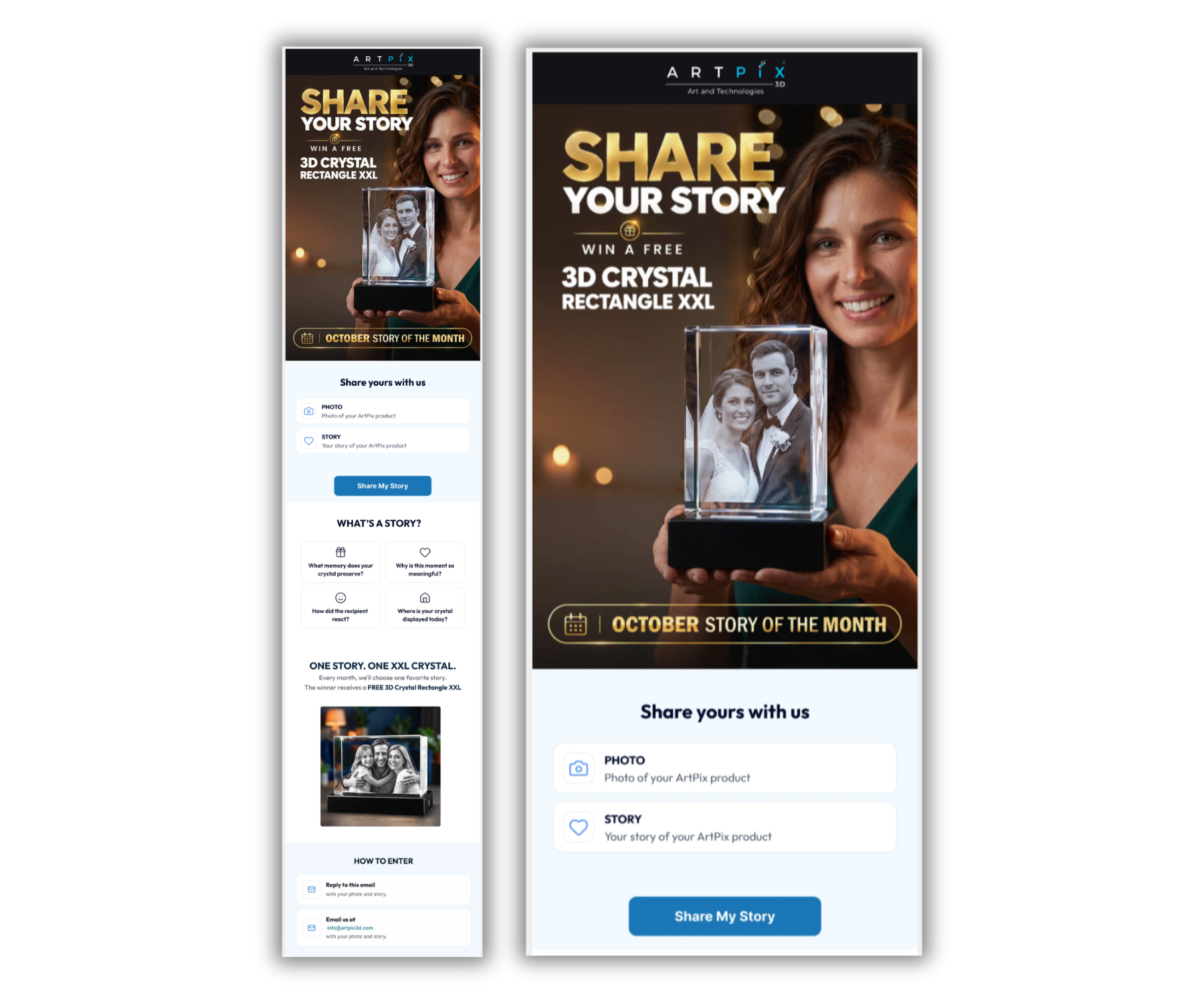
ArtiPix promotional email inviting customers to share a photo and story about their personalized 3D crystal keepsake for a chance to win a free 3D Crystal Rectangle XXL. Features a woman holding an engraved crystal, submission instructions, and a “Share My Story” button.

You could also require entrants to post on social media and tag your brand to maximize reach.  
‍

4 best practices for using UGC in email

Follow these four tips to create effective email content with UGC.

  1. Select high-quality UGC that aligns with your brand's image. Pick social proof that matches brand values and identity, meets your visual standards, and relates to your audience.  
  2. Make the email subject line reflect the social proof angle. Toy around with something like “Hear from your peers” or “The reviews are in” when it’s solely a UGC-focused email. 
  3. Use CTAs to guide recipients to the next step. Always include at least one action-oriented CTA. Pepper in a UGC angle if it makes sense, like “Shop our customers’ favorites.” ‍
  4. Go for the original take. If you find a testimonial that boasts about you in a unique way, run with it. Kakao, for example, pairs a memorable customer review with polished brand photography. 
Email section snippet with the headline "what they said"" followed by teh quote "I sent this to a friend who ould never imagine himself eating vegan food. He is however, a hocoholic and absojtely wolfed these down ... a recommendation indeed!'

Build and leverage UGC with Seguno

Some shoppers hunt for your customer reviews, others stumble upon them, but many never see them at all. Put the best UGC in your emails so more of your audience sees them. The six examples above show they can work in everything from a welcome series to back-in-stock alerts. 

The hardest part is having enough good customer content, and that’s where Seguno Product Reviews helps. Collect store and product reviews, and display them on your storefront. Seguno Email can then send review request emails automatically as part of your post-purchase follow-up.

Seguno also integrates with popular review apps — including Judge.me, Loox, Stamped and Yotpo — so you can bring reviews into your emails. 

Use your best UGC to answer shopper questions, diminish hesitations, and build trust. 

create, manage, and track your email marketing—without leaving Shopify.

Seguno is the top-rated email solution built exclusively for Shopify. Grow your sales with high-performing newsletters, email automation campaigns, and integrations with Facebook, Instagram, banners, pop-ups and more. Build and send engaging emails in our easy-to-use editor and take email creation to the next level with our Canva integration. Automate your email marketing and drive more revenue with welcome campaigns, checkout abandonment, post-purchase automations, tag triggers and more.

Find Seguno on the Shopify App Store
get email marketing tips, resources, and industry insights to help your Shopify store grow.
continue reading
back to blog

Shopify SMS marketing checklist: how to create a real program

Sending texts isn't the same as running a program. Use this SMS marketing checklist to build lasting customer relationships, not just one-off sales.

The 10 best Built for Shopify apps for 2026

Explore the top Built for Shopify apps for scaling operations, from email marketing to referral platforms. We dive into the features behind each app that earned Shopify’s badge of quality.

How to use Shopify Sidekick to identify the right products for your next email

Devise your next email idea with our step-by-step guide. Learn how to use Shopify Sidekick to find gaps between your Seguno email data and your store's top sellers.

Our top takeaways from Shopify Editions Spring 2026

Shopify's Spring '26 "Everywhere" Edition shipped 150+ updates. We sorted through them to bring you the developments that matter most for your store.
<div class="w-layout-hflex unique-discount-report-banner injection"><img src="https://cdn.prod.website-files.com/617bf866dd7a760b2b06c57e/6a7dc19f4a5d0d5ff0286467_the-ultimate-guide-eBook.avif" loading="lazy" sizes="(max-width: 983px) 100vw, 983px" srcset="https://cdn.prod.website-files.com/617bf866dd7a760b2b06c57e/6a7dc19f4a5d0d5ff0286467_the-ultimate-guide-eBook-p-500.avif 500w, https://cdn.prod.website-files.com/617bf866dd7a760b2b06c57e/6a7dc19f4a5d0d5ff0286467_the-ultimate-guide-eBook-p-800.avif 800w, https://cdn.prod.website-files.com/617bf866dd7a760b2b06c57e/6a7dc19f4a5d0d5ff0286467_the-ultimate-guide-eBook.avif 983w" alt="The Ultimate Guide to Shopify Discount Codes by Seguno, the makers of Bulk Discount Code Bot for Shopify merchants" class="udr-banner-image"><div class="w-layout-vflex"><h2 class="udr-banner-h2">The playbook for smarter&nbsp;discounting:</h2><h3 class="udr-banner-h3">the steps for growing revenue and protecting margins with discount&nbsp;codes</h3></div><a href="/ultimate-guide-to-shopify-discounts" class="v4-5-button nowrap w-button">get the free guide</a></div>
<div class="deliveryability-checker-injection"><div><p class="demo-injection-p"><strong class="larger-text">wonder if your emails land in the&nbsp;inbox?</strong><br>get a general idea of where your emails go, and if you might have a spam&nbsp;issue&nbsp;</p><a href="/check-inbox-placement" class="v4-5-button w-button">check your deliverability &nbsp;→</a></div></div>
<div class="app-download-injection canva-connect"><img src="https://cdn.prod.website-files.com/617bf866dd7a760b2b06c57e/64763bd7cc6913d2a1ddbe6a_canva.svg" loading="lazy" alt="Seguno integrates with Canva so you can compose beautiful emails" class="app-download-injection-canva-logo"><div class="app-injection-text-div"><div class="app-download-injection-inner-div white"><div class="_4-9">4.9</div><img src="https://cdn.prod.website-files.com/617bf866dd7a760b2b06c57e/6268403f745506041a490ef2_review-star.svg" loading="lazy" alt="Shopify Review Star" class="download-app-injection-star canva"><div>Shopify Connect for Canva</div></div><div class="app-download-injection-subhead white">instantly access your product images in&nbsp;Canva</div></div><a href="https://apps.shopify.com/canva-connect?ref=seguno&amp;channel=com&amp;utm_source=blog&amp;utm_medium=website&amp;utm_campaign=blog+call+out" target="_blank" class="app-download-injection-button canva w-button">Get details &amp; install</a></div>
<div class="bfcm24-injection"><p class="bfcm24-injection-p"><strong class="larger-text">the no-sweat plan for BFCM email prep</strong><br>6 weeks, one easy task per week</p><a href="/bfcm" class="v4-5-button w-button">get the plan &nbsp;→</a></div>
<div class="app-download-injection"><img src="https://cdn.prod.website-files.com/617bf866dd7a760b2b06c57e/62683f35e7a0c581770d186b_shopify-icon.svg" loading="lazy" alt="Seguno + Shopify 4EVER" class="app-download-injection-shopify-logo"><div class="app-injection-text-div"><div class="app-download-injection-inner-div"><div class="_4-9">4.9</div><img src="https://cdn.prod.website-files.com/617bf866dd7a760b2b06c57e/6268403f745506041a490ef2_review-star.svg" loading="lazy" alt="Shopify Review Star" class="download-app-injection-star"><div>Seguno Dynamic Banners</div></div><div class="app-download-injection-subhead">boost on-site engagement and sales </div></div><a href="https://apps.shopify.com/coupon-banner-with-countdown-carousel?ref=seguno&amp;channel=com&amp;utm_source=blog&amp;utm_medium=website&amp;utm_campaign=blog+call+out&amp;_gl=1*svg4pt*_gcl_au*MTUzMzgzMzYuMTcyMjU0MjE4NA..*_ga*NjgzMjEyMTA2LjE3MjI1NDIxODQ.*_ga_T9CX65NBQN*MTcyMzIxNDEyOS44LjEuMTcyMzIxNDEzMS41OC4wLjU3MTg4NzU0OA.." target="_blank" class="app-download-injection-button w-button">Get details &amp; install</a></div>
<div class="post-purchase-injection"><img src="https://cdn.prod.website-files.com/617bf866dd7a760b2b06c57e/6643cb72a9ef5fafa0dc9eac_post-purchase-automation-flow.webp" loading="lazy" sizes="(max-width: 479px) 83vw, (max-width: 767px) 61vw, (max-width: 991px) 36vw, 35vw" srcset="https://cdn.prod.website-files.com/617bf866dd7a760b2b06c57e/6643cb72a9ef5fafa0dc9eac_post-purchase-automation-flow-p-500.webp 500w, https://cdn.prod.website-files.com/617bf866dd7a760b2b06c57e/6643cb72a9ef5fafa0dc9eac_post-purchase-automation-flow-p-800.webp 800w, https://cdn.prod.website-files.com/617bf866dd7a760b2b06c57e/6643cb72a9ef5fafa0dc9eac_post-purchase-automation-flow-p-1080.webp 1080w, https://cdn.prod.website-files.com/617bf866dd7a760b2b06c57e/6643cb72a9ef5fafa0dc9eac_post-purchase-automation-flow.webp 1200w" alt="Download your custom post-purchase automation template from Seguno" class="pp-image"><div><p class="demo-injection-p"><strong class="larger-text">get a road map for post-purchase emails</strong><br>receive a custom automation template based on your goals &nbsp;</p><a href="/post-purchase" class="v4-5-button w-button">get your free template &nbsp;→</a></div></div>
<div style="display:none;"></div>
<div class="app-download-injection"><img src="https://assets-global.website-files.com/617bf866dd7a760b2b06c57e/62683f35e7a0c581770d186b_shopify-icon.svg" loading="lazy" alt="Seguno + Shopify 4EVER" class="app-download-injection-shopify-logo"><div class="app-injection-text-div"><div class="app-download-injection-inner-div"><div class="_4-9">4.9</div><img src="https://assets-global.website-files.com/617bf866dd7a760b2b06c57e/6268403f745506041a490ef2_review-star.svg" loading="lazy" alt="Shopify Review Star" class="download-app-injection-star"><div>Seguno Product Reviews</div></div><div class="app-download-injection-subhead">gather product customer reviews and leverage feedback</div></div><a href="https://apps.shopify.com/seguno-product-reviews?ref=seguno&amp;channel=com&amp;utm_source=blog&amp;utm_medium=website&amp;utm_campaign=blog+call+out" target="_blank" class="app-download-injection-button w-button">Get details &amp; install</a></div>
<a href="/bfcm" target="_blank" class="holiday-hub-injection bfcm-injection w-inline-block"><div class="bfcm-injection-bfcm">Best. BFCM. Ever.</div><h5 class="hh-injection-text bfcm">get the Black Friday email marketing resources, tips, and tools you need to help your Shopify store succeed</h5><div class="hh23-injection-faux-button bfcm">visit the BFCM resource center</div></a>
<a href="/holiday-hub" target="_blank" class="holiday-hub-injection w-inline-block"><img src="https://global-uploads.webflow.com/617bf866dd7a760b2b06c57e/6509abc2ee5c44d613124ac3_holiday-hub.svg" loading="lazy" width="854" alt="Seguno Holiday Hub - email marketing resources, tips, and tools you need to help your Shopify store succeed" class="hh23-holiday-hub"><h3 class="hh-injection-text">email marketing resources, tips, and tools you need to help your Shopify store succeed</h3><div class="hh23-injection-faux-button">visit the holiday hub</div></a>
<div class="app-download-injection popup-app-injection"><img src="https://cdn.prod.website-files.com/617bf866dd7a760b2b06c57e/62683f35e7a0c581770d186b_shopify-icon.svg" loading="lazy" alt="Seguno + Shopify 4EVER" class="app-download-injection-shopify-logo"><div class="app-injection-text-div"><div class="app-download-injection-inner-div popup-app-injection"><div class="_4-9 popup-app-injection">5.0</div><img src="https://cdn.prod.website-files.com/617bf866dd7a760b2b06c57e/63b58f03d4aad81dd34f199d_review-star-white.svg" loading="lazy" alt="" class="download-app-injection-star"><div>Seguno Popups &amp; Exit Intent</div></div><div class="app-download-injection-subhead">Create, trigger, and track popups from your shop's Admin</div></div><a href="https://apps.shopify.com/seguno-popups?ref=seguno&channel=com&utm_source=courses&utm_medium=website&utm_campaign=how-to-grow-your-email-marketing-list-course" class="app-download-injection-button w-button" target="_blank">Get details &amp; install</a></div>
<div class="app-download-injection"><img src="https://cdn.prod.website-files.com/617bf866dd7a760b2b06c57e/63caa3c6f461e8d2b575af1d_Bulk-Discount-Code-Logo.svg" loading="lazy" alt="Bulk Discount Code Bot App for Shopify" class="app-download-injection-bulk-discount-icon"><div class="app-injection-text-div"><div class="app-download-injection-inner-div"><div class="_4-9">4.9</div><img src="https://cdn.prod.website-files.com/617bf866dd7a760b2b06c57e/6268403f745506041a490ef2_review-star.svg" loading="lazy" alt="Shopify Review Star" class="download-app-injection-star"><div>Bulk Discount Code Bot</div></div><div class="app-download-injection-subhead">Stop coupon abuse with unique discount code sets</div></div><a href="https://apps.shopify.com/bulk-discount-generator?ref=seguno&amp;channel=com&amp;utm_source=blog&amp;utm_medium=website&amp;utm_campaign=blog+call+out" target="_blank" class="app-download-injection-button w-button">Get details &amp; install</a></div>
<div class="app-download-injection popup-app-injection"><img src="https://cdn.prod.website-files.com/617bf866dd7a760b2b06c57e/62683f35e7a0c581770d186b_shopify-icon.svg" loading="lazy" alt="Seguno + Shopify 4EVER" class="app-download-injection-shopify-logo"><div class="app-injection-text-div"><div class="app-download-injection-inner-div popup-app-injection"><div class="_4-9 popup-app-injection">4.9</div><img src="https://cdn.prod.website-files.com/617bf866dd7a760b2b06c57e/63b58f03d4aad81dd34f199d_review-star-white.svg" loading="lazy" alt="" class="download-app-injection-star"><div>Seguno Popups &amp; Exit Intent</div></div><div class="app-download-injection-subhead">Create, trigger, and track popups from your shop's Admin</div></div><a href="https://apps.shopify.com/seguno-popups?ref=seguno&channel=com&utm_source=blog&utm_medium=website&utm_campaign=blog+call+out" class="app-download-injection-button w-button" target="_blank">Get details &amp; install</a></div>
<div class="schedule-a-demo-injection"><div class="demo-injection-heading">Book a 1:1 demo</div><p class="demo-injection-p">Give us 30 minutes and we'll give you a peek at how Seguno's email marketing and popups can elevate your marketing.</p><a href="/schedule-a-demo" class="demo-injection-button w-button">Schedule a Demo</a></div>
<div class="getting-started-injection"><div class="getting-started-subhead">Blog Series</div><h3 class="getting-started-heading">6 steps to start email marketing for your Shopify store</h3><div class="getting-started-collection w-dyn-list"><div role="list" class="getting-started-list w-dyn-items"><div role="listitem" class="getting-started-item w-dyn-item"><a href="/blog/how-to-define-your-unique-selling-proposition" class="getting-started-link w-inline-block"><img src="https://cdn.prod.website-files.com/617bf866dd7a76530b06c57f/6303b64cb6ad91731ba18f27_Post%202%20thumbnail.png" loading="lazy" alt="How to define your unique selling proposition" class="getting-started-image"></a></div><div role="listitem" class="getting-started-item w-dyn-item"><a href="/blog/how-to-grow-your-audience" class="getting-started-link w-inline-block"><img src="https://cdn.prod.website-files.com/617bf866dd7a76530b06c57f/6303b65da556932aea94fa5b_Post%203%20thumbnail.png" loading="lazy" alt="How to grow your audience " class="getting-started-image"></a></div><div role="listitem" class="getting-started-item w-dyn-item"><a href="/blog/your-first-email-automation-start-with-hello" class="getting-started-link w-inline-block"><img src="https://cdn.prod.website-files.com/617bf866dd7a76530b06c57f/6303b66bed7eea3f461421d9_Post%204%20thumbnail.png" loading="lazy" alt="Say hello with your first email automation " class="getting-started-image"></a></div><div role="listitem" class="getting-started-item w-dyn-item"><a href="/blog/tips-for-building-your-first-newsletter" class="getting-started-link w-inline-block"><img src="https://cdn.prod.website-files.com/617bf866dd7a76530b06c57f/6303b68e19aa7b0ce706d5f8_Post%205%20thumbnail.png" loading="lazy" alt="Tips for building your first newsletter " class="getting-started-image"></a></div><div role="listitem" class="getting-started-item w-dyn-item"><a href="/blog/make-email-marketing-efficient-with-templates" class="getting-started-link w-inline-block"><img src="https://cdn.prod.website-files.com/617bf866dd7a76530b06c57f/6303b69e30b81b5b3cfcf791_Post%206%20thumbnail.png" loading="lazy" alt="Make email marketing efficient with templates" class="getting-started-image"></a></div><div role="listitem" class="getting-started-item w-dyn-item"><a href="/blog/convert-interest-to-sales-with-email-automations" class="getting-started-link w-inline-block"><img src="https://cdn.prod.website-files.com/617bf866dd7a76530b06c57f/6303b6b14cae251dbc6a89aa_Post%207%20thumbnail.png" loading="lazy" alt="Convert interest to sales with email automations" class="getting-started-image"></a></div></div></div> <script> window.addEventListener("load",(t=>{var r=$(location).attr("href").split("/").reverse()[0];$(".getting-started-item").each((function(t){var e=$(this).find("a"),s=e.attr("href");r==s.substring(6,s.length)&&(e.attr("href","#"),e.css("opacity","0.3"),e.css("cursor","default"),e.css("transform","none"))}))})); </script>
<div class="app-download-injection"><img src="https://assets.website-files.com/617bf866dd7a760b2b06c57e/62683f35e7a0c581770d186b_shopify-icon.svg" loading="lazy" alt="Seguno + Shopify 4EVER" class="app-download-injection-shopify-logo"><div class="app-injection-text-div"><div class="app-download-injection-inner-div"><div class="_4-9">4.8</div><img src="https://assets.website-files.com/617bf866dd7a760b2b06c57e/6268403f745506041a490ef2_review-star.svg" loading="lazy" alt="Shopify Review Star" class="download-app-injection-star"><div>Seguno Email&nbsp;Marketing</div></div><div class="app-download-injection-subhead">The top-rated email marketing app built exclusively for Shopify</div></div><a href="https://apps.shopify.com/seguno?ref=seguno&channel=com&utm_source=blog&utm_medium=website&utm_campaign=blog+call+out" class="app-download-injection-button w-button" target="_blank">Get details &amp; install</a></div>
<div class="v3-email-signup-section blog-email-signup-insert"><p class="v3-lp-h1 text-white blog-signup-insert">Subscribe to get email marketing tips, resources, and industry insights to help your Shopify store grow.</p><div class="v3-form email-only-form form-centered w-form"><form id="wf-form-Email-Subscription" name="wf-form-Email-Subscription" data-name="Email Subscription" method="get" class="email-only-form" data-wf-page-id="617bf866dd7a76703506c655" data-wf-element-id="e33b17bb-76b8-992b-7b38-764576544155" aria-label="Email Subscription"><input type="email" class="email-only w-input" maxlength="256" name="Email" data-name="Email" placeholder="Please enter your email address" id="Email" required=""><input type="submit" value="Subscribe →" data-wait="Please wait..." class="v3-base-button brown-button email-only-form-button button-rollover w-button"></form><div class="email-only-success-message w-form-done" tabindex="-1" role="region" aria-label="Email Subscription success"><div class="events-text-block text-white center-text"><strong>Awesome, thanks for subscribing!</strong></div></div><div class="w-form-fail" tabindex="-1" role="region" aria-label="Email Subscription failure"><div>Oops! Something went wrong while submitting the form.</div></div></div><div class="email-disclaimer">By submitting this form you agree to receive email marketing messages from Seguno.</div></div>