Seguno Email Marketing built for Shopify
let's chat
HomeSeguno Blog

Margin-smart discounting: a guide to profitable Shopify discounts

Author
Tracy Puckett
Tracy Puckett
Content Manager
Contributors
No items found.

A playbook from Caddis Eye Appliances’ VP of Performance Marketing

It’s easy to fall into the habit of repeatedly offering the same blanket discount because it spiked sales in the past. Or worse, arbitrarily picking a discount and crossing your fingers for the best. 

Strategic Shopify marketers like Becky Chambers of Caddis Eye Appliances approach discounting differently. They treat them as investments fueled by meticulous planning, specific goals, and post-promo analysis. 

In this margin-smart discounting playbook, Becky shares a five-step process for running successful promos and determining whether discounts actually drive incremental revenue.  

Meet the expert 

Becky has decades of experience leading DTC full-funnel marketing for lifestyle brands. As VP of Performance Marketing, she oversees loyalty programs, customer relationship management, and retention initiatives for the Caddis eyewear brand. 

“The best performance marketing engine relies on deeply understanding the customer,” Becky says. “I’ve spent my career bridging the gap between what the numbers show and what a customer actually feels.”

Becky is an expert at poring over discount code analytics to evaluate their expense, payoffs, and efficiency. 

The 4 principles of smarter discounting 

Running broad promotions like a BFCM sale is part of the ecommerce playbook. But prudent discounting involves — as Becky puts it — “under-the-hood” targeting year-round. 

Margin-smart discounting isn’t just a marketing tactic. It’s an intentional strategy buoyed by a handful of core beliefs: 

  1. Targeted promotions beat blanket promos. Tailoring Shopify discounts based on a person’s actions or inactions is the definition of personalization. You limit unnecessary giveaways while upholding your brand’s perceived value. 
  2. Unique discount codes are critical for control. One-time coupon codes — which Becky generates through Seguno’s Bulk Discount Code Bot — prevent leakage, safeguard margins, and enable richer offers. They come with something else: attribution for deeper analysis. 
  3. Efficiency is paramount. A large discount might skyrocket sales, but it’s essential to ask, “Does this discount actually earn its keep?”
  4. Testing is key to scaling. There’s experimenting with discount types. And then there’s elevating testing with control groups for reassurance.  
headshot of becky chambers, vp of performance marketing, caddis eye appliances, and the quote "With Bulk Discount Code Bot, we prevent leakage and gain attribution"

A five-part playbook for efficient discounting

Becky explains it’s important for Caddis discounts to be additive and create new sales, saying, “We don't want to lose money on purchases that would have happened without it — or lose margin where we don't have to.”   

Below is the process she recommends if you want to engineer a “covert and strategic” promotion. 

Step #1: Identify which customers to target

Other than the occasional sitewide sale for large events like BFCM, limit your discounts. 

Becky primarily applies discounts to lifecycle segments through Caddis automations:  

  • Email subscribers receive a new customer discount in the welcome email
  • Lapsed purchasers receive direct mail with a code 
  • Loyalty members receive discount codes when hitting thresholds
screenshot of a partial email from caddis with the headline 'hey, you made it. take 20% off your first purchase with code [blurred] and a 'shop now' button
The Caddis welcome email includes a unique discount code 

She also sends newsletter campaigns to particular customer segments. 

“There are times when we will target people in a really specific way,” she says. “For example, if there's a color we think they would like or we want to get them into new categories, such as prescription or sunglasses.” 

Segment easily with the Shopify data you already have. Download our Advanced Shopify Segmentation Playbook and get 13 ready-to-use Shopify segments.

Step #2: Create and run your promotion 

After you’ve settled on the promotional pricing strategy and Shopify discount type, create a set of unique codes with discount safeguards to prevent leaks. 

Seguno’s Bulk Discount Code Bot is an integral component of Becky’s discounting program. With it, she creates unlimited unique codes that can be uploaded to any marketing channel. 

The app also enables granular attribution. Use Campaign, Department, and Channel fields to deepen data collection and simplify reporting.

Promote your discount codes through the channels that make sense for the message and target segment.   

{{install-bulk}}

Step #3: Identify efficient discounts 

At the beginning of every quarter, gather all the discount codes you offered over the previous three months. It’s time to determine the efficiency of every promo you ran. 

Here’s how to calculate efficiency for each discount:  

#1. Open the discount and copy the Discount ID from the end of the URL.

screenshot of a URL address with the end numbers boxed in red

#2. Open the Shopify “sales by discount” report and enter the discount ID in the filter sidebar to isolate all codes under the discount. Be sure to set your timeframe to include when the discount was active. 

The example below shows reporting for one set of unique discount codes — including a topline tally of all unique codes used, followed by the performance breakdown for each individual code.

Screenshot within Shopify reports showing a barchart of total sales by discount code at the top, and a detailed chart below of applied discounts, discounted orders, gross sales, returns, and net sales for each discount

#3. From the summary line, extract the:    

  • Total net sales (the full retail price minus the discounts and returns)
  • Total applied discount (the total discount/promo cost

#4. Calculate the efficiency by dividing net sales by the applied discount cost. In the example above, $37,358.96 in net sales divided by the $4,389.12 promo deduction equals an efficiency of 8.5x.

Whether 8.5x is efficient depends on the brand. Every brand needs to define a target efficiency based on its own margins. 

For Caddis, Becky defines efficiency as a return of at least 3x. For every dollar spent on a discount, she aims to generate at least $3 in net revenue. Any discount that meets this threshold is profitable. 

The 3x benchmark helps ensure:

  • There’s room to cover the cost of goods sold (COGS), shipping, and operations
  • The discount isn’t just buying revenue at a loss

Step #4: Examine performance from different angles 

Discount efficiency is a baseline performance measure. Refine your strategy — so you can target more wisely — with deeper analysis. 

Bulk Discount Code Bot provides exportable reports for analyzing data points such as code redemption prevalence and average order value (AOV) by code. 

There’s also a dashboard for slicing the data in multiple ways, so you can gauge which campaigns, channels, and company departments are making an impact. Analyze discount revenue, redemptions, and AOV by: 

  • Discount set
  • Promotional campaign/marketing effort
  • Marketing channel for distribution
  • The departments that created discounts 
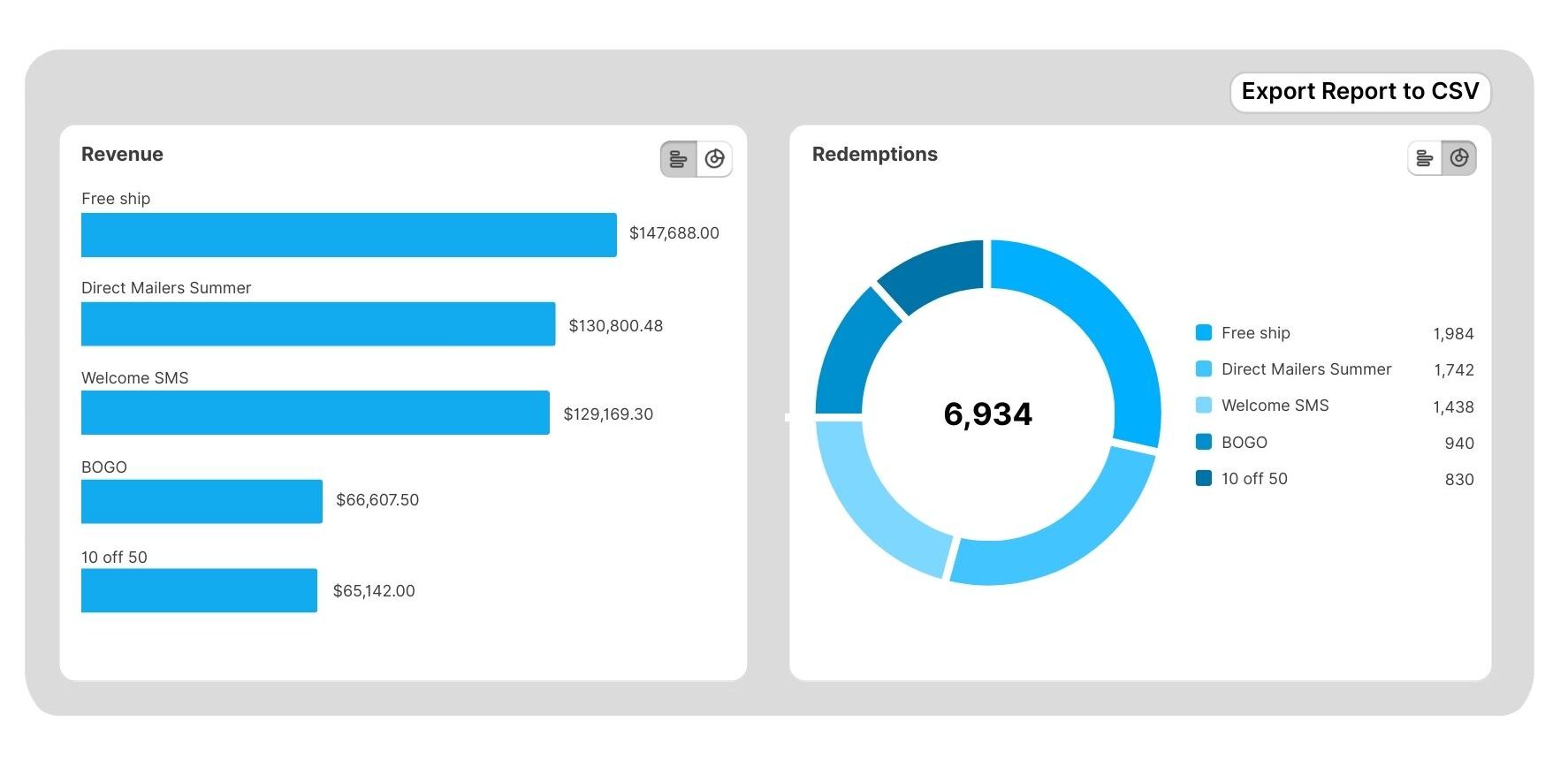
screenshot within bulk discount code bot showing revenue and redemption reporting
A reporting feature within Bulk Discount Code Bot

Step #5: Continue to test

Once you’ve pinpointed efficient discounts and analyzed performance, use your findings to test discounts with other segments. You could also experiment by distributing promos through a different marketing channel.  

Or, add rigor with a test-control experiment. Send one-half of a segment the efficient discount (the test group) and the other half nothing (the control group). If you see a lift in the test group — net revenue, conversions, reactivation, etc. —  then it’s a worthwhile strategy.  

What margin-smart discounting achieves

Becky’s replicable process for deploying margin-smart discounts can have a ripple effect for any brand. Here’s what she’s seen at Caddis:   

  • Higher promo efficiency year over year, leading to higher sales. “We spent more on promos last year versus the previous year, but we were way, way, way more efficient.”
  • Zero leakage on sensitive discounts. Thanks to unique codes, she doesn’t worry about a targeted promotion going viral ever again.
  • Hours saved each quarter. Her time-tested efficiency method reduces detective work and increases capacity for strategic planning.

Fuel your intelligent discount strategy with targeted promotions, experimentation, and the Bulk Discount Code Bot for creating, managing, and analyzing unique codes. 

{{install-bulk}}
create, manage, and track your email marketing—without leaving Shopify.

Seguno is the top-rated email solution built exclusively for Shopify. Grow your sales with high-performing newsletters, email automation campaigns, and integrations with Facebook, Instagram, banners, pop-ups and more. Build and send engaging emails in our easy-to-use editor and take email creation to the next level with our Canva integration. Automate your email marketing and drive more revenue with welcome campaigns, checkout abandonment, post-purchase automations, tag triggers and more.

Find Seguno on the Shopify App Store
get email marketing tips, resources, and industry insights to help your Shopify store grow.
continue reading
back to blog

How to use popups and customer tags to personalize emails

More data leads to better segmentation. Learn how to collect more information at email signup with form fields and customer tags.

5 ways to take advantage of Shopify’s segmentation tool

One of the most powerful ways to achieve personalization is by segmenting your subscriber list. We illustrate five ways to use Shopify’s customer segment tool.

The ultimate guide to personalizing emails with behavioral targeting

Deliver more value by shaping email messages with behavioral data. Learn how to use behavioral targeting to increase email engagement, conversions and brand loyalty.

9 discounting safeguards to prevent coupon abuse and protect Shopify profit margins

Learn nine discounting safeguards to help drive Shopify sales while protecting profit margins and avoiding over-discounting.
<div class="deliveryability-checker-injection"><div><p class="demo-injection-p"><strong class="larger-text">wonder if your emails land in the&nbsp;inbox?</strong><br>get a general idea of where your emails go, and if you might have a spam&nbsp;issue&nbsp;</p><a href="/check-inbox-placement" class="v4-5-button w-button">check your deliverability &nbsp;→</a></div></div>
<div class="app-download-injection canva-connect"><img src="https://cdn.prod.website-files.com/617bf866dd7a760b2b06c57e/64763bd7cc6913d2a1ddbe6a_canva.svg" loading="lazy" alt="Seguno integrates with Canva so you can compose beautiful emails" class="app-download-injection-canva-logo"><div class="app-injection-text-div"><div class="app-download-injection-inner-div white"><div class="_4-9">4.9</div><img src="https://cdn.prod.website-files.com/617bf866dd7a760b2b06c57e/6268403f745506041a490ef2_review-star.svg" loading="lazy" alt="Shopify Review Star" class="download-app-injection-star canva"><div>Shopify Connect for Canva</div></div><div class="app-download-injection-subhead white">instantly access your product images in&nbsp;Canva</div></div><a href="https://apps.shopify.com/canva-connect?ref=seguno&amp;channel=com&amp;utm_source=blog&amp;utm_medium=website&amp;utm_campaign=blog+call+out" target="_blank" class="app-download-injection-button canva w-button">Get details &amp; install</a></div>
<div class="bfcm24-injection"><p class="bfcm24-injection-p"><strong class="larger-text">the no-sweat plan for BFCM email prep</strong><br>6 weeks, one easy task per week</p><a href="/bfcm" class="v4-5-button w-button">get the plan &nbsp;→</a></div>
<div class="app-download-injection"><img src="https://cdn.prod.website-files.com/617bf866dd7a760b2b06c57e/62683f35e7a0c581770d186b_shopify-icon.svg" loading="lazy" alt="Seguno + Shopify 4EVER" class="app-download-injection-shopify-logo"><div class="app-injection-text-div"><div class="app-download-injection-inner-div"><div class="_4-9">4.9</div><img src="https://cdn.prod.website-files.com/617bf866dd7a760b2b06c57e/6268403f745506041a490ef2_review-star.svg" loading="lazy" alt="Shopify Review Star" class="download-app-injection-star"><div>Seguno Dynamic Banners</div></div><div class="app-download-injection-subhead">boost on-site engagement and sales </div></div><a href="https://apps.shopify.com/coupon-banner-with-countdown-carousel?ref=seguno&amp;channel=com&amp;utm_source=blog&amp;utm_medium=website&amp;utm_campaign=blog+call+out&amp;_gl=1*svg4pt*_gcl_au*MTUzMzgzMzYuMTcyMjU0MjE4NA..*_ga*NjgzMjEyMTA2LjE3MjI1NDIxODQ.*_ga_T9CX65NBQN*MTcyMzIxNDEyOS44LjEuMTcyMzIxNDEzMS41OC4wLjU3MTg4NzU0OA.." target="_blank" class="app-download-injection-button w-button">Get details &amp; install</a></div>
<div class="post-purchase-injection"><img src="https://cdn.prod.website-files.com/617bf866dd7a760b2b06c57e/6643cb72a9ef5fafa0dc9eac_post-purchase-automation-flow.webp" loading="lazy" sizes="(max-width: 479px) 83vw, (max-width: 767px) 61vw, (max-width: 991px) 36vw, 35vw" srcset="https://cdn.prod.website-files.com/617bf866dd7a760b2b06c57e/6643cb72a9ef5fafa0dc9eac_post-purchase-automation-flow-p-500.webp 500w, https://cdn.prod.website-files.com/617bf866dd7a760b2b06c57e/6643cb72a9ef5fafa0dc9eac_post-purchase-automation-flow-p-800.webp 800w, https://cdn.prod.website-files.com/617bf866dd7a760b2b06c57e/6643cb72a9ef5fafa0dc9eac_post-purchase-automation-flow-p-1080.webp 1080w, https://cdn.prod.website-files.com/617bf866dd7a760b2b06c57e/6643cb72a9ef5fafa0dc9eac_post-purchase-automation-flow.webp 1200w" alt="Download your custom post-purchase automation template from Seguno" class="pp-image"><div><p class="demo-injection-p"><strong class="larger-text">get a road map for post-purchase emails</strong><br>receive a custom automation template based on your goals &nbsp;</p><a href="/post-purchase" class="v4-5-button w-button">get your free template &nbsp;→</a></div></div>
<div style="display:none;"></div>
<div class="app-download-injection"><img src="https://assets-global.website-files.com/617bf866dd7a760b2b06c57e/62683f35e7a0c581770d186b_shopify-icon.svg" loading="lazy" alt="Seguno + Shopify 4EVER" class="app-download-injection-shopify-logo"><div class="app-injection-text-div"><div class="app-download-injection-inner-div"><div class="_4-9">4.9</div><img src="https://assets-global.website-files.com/617bf866dd7a760b2b06c57e/6268403f745506041a490ef2_review-star.svg" loading="lazy" alt="Shopify Review Star" class="download-app-injection-star"><div>Seguno Product Reviews</div></div><div class="app-download-injection-subhead">gather product customer reviews and leverage feedback</div></div><a href="https://apps.shopify.com/seguno-product-reviews?ref=seguno&amp;channel=com&amp;utm_source=blog&amp;utm_medium=website&amp;utm_campaign=blog+call+out" target="_blank" class="app-download-injection-button w-button">Get details &amp; install</a></div>
<a href="/bfcm" target="_blank" class="holiday-hub-injection bfcm-injection w-inline-block"><div class="bfcm-injection-bfcm">Best. BFCM. Ever.</div><h5 class="hh-injection-text bfcm">get the Black Friday email marketing resources, tips, and tools you need to help your Shopify store succeed</h5><div class="hh23-injection-faux-button bfcm">visit the BFCM resource center</div></a>
<a href="/holiday-hub" target="_blank" class="holiday-hub-injection w-inline-block"><img src="https://global-uploads.webflow.com/617bf866dd7a760b2b06c57e/6509abc2ee5c44d613124ac3_holiday-hub.svg" loading="lazy" width="854" alt="Seguno Holiday Hub - email marketing resources, tips, and tools you need to help your Shopify store succeed" class="hh23-holiday-hub"><h3 class="hh-injection-text">email marketing resources, tips, and tools you need to help your Shopify store succeed</h3><div class="hh23-injection-faux-button">visit the holiday hub</div></a>
<div class="app-download-injection popup-app-injection"><img src="https://cdn.prod.website-files.com/617bf866dd7a760b2b06c57e/62683f35e7a0c581770d186b_shopify-icon.svg" loading="lazy" alt="Seguno + Shopify 4EVER" class="app-download-injection-shopify-logo"><div class="app-injection-text-div"><div class="app-download-injection-inner-div popup-app-injection"><div class="_4-9 popup-app-injection">5.0</div><img src="https://cdn.prod.website-files.com/617bf866dd7a760b2b06c57e/63b58f03d4aad81dd34f199d_review-star-white.svg" loading="lazy" alt="" class="download-app-injection-star"><div>Seguno Popups &amp; Exit Intent</div></div><div class="app-download-injection-subhead">Create, trigger, and track popups from your shop's Admin</div></div><a href="https://apps.shopify.com/seguno-popups?ref=seguno&channel=com&utm_source=courses&utm_medium=website&utm_campaign=how-to-grow-your-email-marketing-list-course" class="app-download-injection-button w-button" target="_blank">Get details &amp; install</a></div>
<div class="app-download-injection"><img src="https://cdn.prod.website-files.com/617bf866dd7a760b2b06c57e/63caa3c6f461e8d2b575af1d_Bulk-Discount-Code-Logo.svg" loading="lazy" alt="Bulk Discount Code Bot App for Shopify" class="app-download-injection-bulk-discount-icon"><div class="app-injection-text-div"><div class="app-download-injection-inner-div"><div class="_4-9">4.9</div><img src="https://cdn.prod.website-files.com/617bf866dd7a760b2b06c57e/6268403f745506041a490ef2_review-star.svg" loading="lazy" alt="Shopify Review Star" class="download-app-injection-star"><div>Bulk Discount Code Bot</div></div><div class="app-download-injection-subhead">Stop coupon abuse with unique discount code sets</div></div><a href="https://apps.shopify.com/bulk-discount-generator?ref=seguno&amp;channel=com&amp;utm_source=blog&amp;utm_medium=website&amp;utm_campaign=blog+call+out" target="_blank" class="app-download-injection-button w-button">Get details &amp; install</a></div>
<div class="app-download-injection popup-app-injection"><img src="https://cdn.prod.website-files.com/617bf866dd7a760b2b06c57e/62683f35e7a0c581770d186b_shopify-icon.svg" loading="lazy" alt="Seguno + Shopify 4EVER" class="app-download-injection-shopify-logo"><div class="app-injection-text-div"><div class="app-download-injection-inner-div popup-app-injection"><div class="_4-9 popup-app-injection">4.7</div><img src="https://cdn.prod.website-files.com/617bf866dd7a760b2b06c57e/63b58f03d4aad81dd34f199d_review-star-white.svg" loading="lazy" alt="" class="download-app-injection-star"><div>Seguno Popups &amp; Exit Intent</div></div><div class="app-download-injection-subhead">Create, trigger, and track popups from your shop's Admin</div></div><a href="https://apps.shopify.com/seguno-popups?ref=seguno&channel=com&utm_source=blog&utm_medium=website&utm_campaign=blog+call+out" class="app-download-injection-button w-button" target="_blank">Get details &amp; install</a></div>
<div class="schedule-a-demo-injection"><div class="demo-injection-heading">Book a 1:1 demo</div><p class="demo-injection-p">Give us 30 minutes and we'll give you a peek at how Seguno's email marketing and popups can elevate your marketing.</p><a href="/schedule-a-demo" class="demo-injection-button w-button">Schedule a Demo</a></div>
<div class="getting-started-injection"><div class="getting-started-subhead">Blog Series</div><h3 class="getting-started-heading">6 steps to start email marketing for your Shopify store</h3><div class="getting-started-collection w-dyn-list"><div role="list" class="getting-started-list w-dyn-items"><div role="listitem" class="getting-started-item w-dyn-item"><a href="/blog/how-to-define-your-unique-selling-proposition" class="getting-started-link w-inline-block"><img src="https://cdn.prod.website-files.com/617bf866dd7a76530b06c57f/6303b64cb6ad91731ba18f27_Post%202%20thumbnail.png" loading="lazy" alt="How to define your unique selling proposition" class="getting-started-image"></a></div><div role="listitem" class="getting-started-item w-dyn-item"><a href="/blog/how-to-grow-your-audience" class="getting-started-link w-inline-block"><img src="https://cdn.prod.website-files.com/617bf866dd7a76530b06c57f/6303b65da556932aea94fa5b_Post%203%20thumbnail.png" loading="lazy" alt="How to grow your audience " class="getting-started-image"></a></div><div role="listitem" class="getting-started-item w-dyn-item"><a href="/blog/your-first-email-automation-start-with-hello" class="getting-started-link w-inline-block"><img src="https://cdn.prod.website-files.com/617bf866dd7a76530b06c57f/6303b66bed7eea3f461421d9_Post%204%20thumbnail.png" loading="lazy" alt="Say hello with your first email automation " class="getting-started-image"></a></div><div role="listitem" class="getting-started-item w-dyn-item"><a href="/blog/tips-for-building-your-first-newsletter" class="getting-started-link w-inline-block"><img src="https://cdn.prod.website-files.com/617bf866dd7a76530b06c57f/6303b68e19aa7b0ce706d5f8_Post%205%20thumbnail.png" loading="lazy" alt="Tips for building your first newsletter " class="getting-started-image"></a></div><div role="listitem" class="getting-started-item w-dyn-item"><a href="/blog/make-email-marketing-efficient-with-templates" class="getting-started-link w-inline-block"><img src="https://cdn.prod.website-files.com/617bf866dd7a76530b06c57f/6303b69e30b81b5b3cfcf791_Post%206%20thumbnail.png" loading="lazy" alt="Make email marketing efficient with templates" class="getting-started-image"></a></div><div role="listitem" class="getting-started-item w-dyn-item"><a href="/blog/convert-interest-to-sales-with-email-automations" class="getting-started-link w-inline-block"><img src="https://cdn.prod.website-files.com/617bf866dd7a76530b06c57f/6303b6b14cae251dbc6a89aa_Post%207%20thumbnail.png" loading="lazy" alt="Convert interest to sales with email automations" class="getting-started-image"></a></div></div></div> <script> window.addEventListener("load",(t=>{var r=$(location).attr("href").split("/").reverse()[0];$(".getting-started-item").each((function(t){var e=$(this).find("a"),s=e.attr("href");r==s.substring(6,s.length)&&(e.attr("href","#"),e.css("opacity","0.3"),e.css("cursor","default"),e.css("transform","none"))}))})); </script>
<div class="app-download-injection"><img src="https://assets.website-files.com/617bf866dd7a760b2b06c57e/62683f35e7a0c581770d186b_shopify-icon.svg" loading="lazy" alt="Seguno + Shopify 4EVER" class="app-download-injection-shopify-logo"><div class="app-injection-text-div"><div class="app-download-injection-inner-div"><div class="_4-9">4.8</div><img src="https://assets.website-files.com/617bf866dd7a760b2b06c57e/6268403f745506041a490ef2_review-star.svg" loading="lazy" alt="Shopify Review Star" class="download-app-injection-star"><div>Seguno Email&nbsp;Marketing</div></div><div class="app-download-injection-subhead">The top-rated email marketing app built exclusively for Shopify</div></div><a href="https://apps.shopify.com/seguno?ref=seguno&channel=com&utm_source=blog&utm_medium=website&utm_campaign=blog+call+out" class="app-download-injection-button w-button" target="_blank">Get details &amp; install</a></div>
<div class="v3-email-signup-section blog-email-signup-insert"><p class="v3-lp-h1 text-white blog-signup-insert">Subscribe to get email marketing tips, resources, and industry insights to help your Shopify store grow.</p><div class="v3-form email-only-form form-centered w-form"><form id="wf-form-Email-Subscription" name="wf-form-Email-Subscription" data-name="Email Subscription" method="get" class="email-only-form" data-wf-page-id="617bf866dd7a76703506c655" data-wf-element-id="e33b17bb-76b8-992b-7b38-764576544155" aria-label="Email Subscription"><input type="email" class="email-only w-input" maxlength="256" name="Email" data-name="Email" placeholder="Please enter your email address" id="Email" required=""><input type="submit" value="Subscribe →" data-wait="Please wait..." class="v3-base-button brown-button email-only-form-button button-rollover w-button"></form><div class="email-only-success-message w-form-done" tabindex="-1" role="region" aria-label="Email Subscription success"><div class="events-text-block text-white center-text"><strong>Awesome, thanks for subscribing!</strong></div></div><div class="w-form-fail" tabindex="-1" role="region" aria-label="Email Subscription failure"><div>Oops! Something went wrong while submitting the form.</div></div></div><div class="email-disclaimer">By submitting this form you agree to receive email marketing messages from Seguno.</div></div>